

Reliable local control separates Home Assistant and SmartThings at the architecture level – one platform runs your automations on hardware you own, the other routes every command through a server in a data center you’ll never see. That gap is invisible on the spec sheet and only shows up at 11 p.m. when your door lock won’t respond because Samsung’s cloud is having a bad night.
This comparison covers every dimension that actually matters for an intermediate smart home: privacy model, setup effort, device compatibility, automation depth, and the real three-year cost. By the end, you’ll know exactly which platform fits your household – and your patience.
The Local vs. Cloud Divide: Ownership, Privacy, and When “Free” Breaks Down
Local control and cloud dependency aren’t just technical footnotes – they’re the architectural DNA of each platform, and they determine what happens to your home when the internet goes sideways. Home Assistant runs all automation logic on hardware you physically own, inside your network, by default. SmartThings operates on a hybrid model where the hub handles some device-level protocol execution locally, but every automation, remote command, and firmware handshake routes through the SmartThings cloud before it reaches your devices.
That distinction matters the moment your ISP has a bad afternoon. On Home Assistant, your motion sensors still trigger your lights, your thermostat still follows its schedule, and your door lock still responds – because none of that logic ever left your house. On SmartThings, the hub may be sitting three feet from your phone, but if SmartThings’ servers are unreachable, your automations are frozen.
Privacy follows the same fault line. Home Assistant keeps every device command, sensor reading, and presence detection event inside your local network unless you explicitly opt into an external service. The default weather card calls an external API. The built-in voice assistant pipeline phones home. But those are opt-in add-ons – strip them out, set firewall rules, and your home data never leaves your router. SmartThings doesn’t offer that choice. Device states, routine triggers, and command histories flow to SmartThings’ servers as a condition of the platform’s operation, even for automations that appear to run locally.
This is where the “Home Assistant is always private” myth needs correcting. A default Home Assistant install is not a sealed local box. Nabu Casa, the official remote access subscription, is a cloud tunnel. The default weather integration calls external APIs. Achieving genuine network isolation requires intentional work: disabling cloud-dependent integrations, setting up an internal DNS resolver, and routing voice commands to a local model. That’s absolutely doable – but it’s not the out-of-the-box state, and every guide that skips this nuance is doing you a disservice.
The community experience around SmartThings cloud dependency isn’t subtle. Across Reddit threads and Facebook groups, the most consistently reported reason for migrating away from SmartThings isn’t missing features – it’s outages. Users describe thermostats going unresponsive, door locks becoming unreachable, and lighting scenes refusing to fire during cloud maintenance windows that can stretch for hours. The “set and forget” promise breaks down exactly when reliability matters most.
As Sang-Hoon Lee, an automation systems researcher, puts it:
“SmartThings Edge architecture enables local execution of device logic on a hub-level controller, eliminating the dependency on cloud round-trips for time-critical operations.”
That’s accurate for device-level logic – Edge drivers do run on the hub. But automation orchestration, the layer that decides when and why a device does something, still depends on Samsung’s infrastructure. The architectural improvement is real; the cloud dependency isn’t fully resolved.
These differences aren’t isolated quirks. They ripple into every other dimension of this comparison: how long setup takes, which devices you can connect, how complex your automations can get, and what you’ll actually spend over three years. Those are the next four sections.
Setup & Learning Curve: From a 5-Minute Phone Scan to YAML Editing
Setup complexity is where the philosophical gap between these two platforms becomes viscerally real – and where most people make or break their choice before they’ve even touched a device. SmartThings gets you from box to working automation in under an hour. Home Assistant gets you from box to a functioning core in roughly three days, and from there to “stop fiddling” in three months.
That’s not an exaggeration – it’s the cadence that shows up repeatedly in community accounts.
The SmartThings first hour looks like this: download the app, scan the QR code on the hub, watch it auto-detect nearby devices, and tap through the visual routine builder to set up your first “if motion, then light” rule. No config files. No terminal window. No decisions about networking. The system makes reasonable assumptions and hides the complexity beneath a polished interface. For a household that wants convenience without a project, that experience is genuinely good.
The Home Assistant first hour looks different. Before you touch the interface, you’re choosing hardware – a Raspberry Pi 4 with an SD card, a purpose-built Home Assistant Green at $99, a Home Assistant Yellow with onboard Zigbee radio, or an x86 mini-PC if you want more headroom. Then you’re flashing firmware, connecting to the Supervisor panel, and immediately facing decisions: which add-ons do you need? Which integrations match your devices? What’s your networking plan for remote access? The platform assumes you want control, and it hands you all of it at once.
The three-day-to-functional timeline reflects that reality. You’re not just plugging in a hub – you’re configuring a home server. The reward for that investment is a platform that never hits a ceiling. The cost is that the ceiling doesn’t exist to protect you from the complexity underneath it.
The maintenance profiles diverge just as sharply. SmartThings pushes updates silently. You don’t approve them, you don’t schedule them, and you sometimes discover they’ve broken an automation after the fact. Home Assistant releases detailed changelogs with every version, flags breaking changes explicitly, and lets you decide when to upgrade. That’s genuinely better – but it requires you to actually read the release notes and act on them. The responsibility shifts from SmartThings to you, and that trade-off is either liberating or exhausting depending on your disposition.
Here’s a video that walks through both first-hour experiences side by side – the SmartThings phone-scan flow versus the Home Assistant hardware prep and initial configuration – so you can see exactly what you’re signing up for before you buy anything:
Device Ecosystem: SmartThings’ Certified Shelves vs. the Open-Source Bazaar
Device compatibility is where your existing hardware either becomes an asset or a compatibility spreadsheet. Both platforms handle mainstream consumer gear well – but they diverge sharply the moment you step outside the top 50 brands.
SmartThings runs on a curated certification model. Popular brands – Philips Hue, Ring, Yale, Schlage, Arlo – have official device handlers and usually pair without friction. The trade-off is that the certification program is selective. A less common Zigbee sensor, an obscure Wi-Fi thermostat, or a niche energy monitor may never get a direct handler. If it’s not on SmartThings’ approved list, you’re either waiting for community support or working around it.
Home Assistant takes the opposite approach. Over 2,000 community-maintained integrations cover everything from enterprise energy monitors to regional HVAC controllers that most Americans have never heard of. Raw Zigbee access via a USB dongle and Zigbee2MQTT means you can pair virtually any Zigbee device regardless of brand, and you get full attribute access – not just on/off, but battery percentage, link quality (RSSI), tamper flags, and firmware version. That depth enables automations that SmartThings simply can’t build.
The depth-of-control gap is real and practical. SmartThings exposes a curated set of parameters per device – the ones it decided you’d need. Home Assistant surfaces every attribute the device firmware reports. If you want an automation that triggers when a sensor’s battery drops below 15%, or one that adjusts behavior based on Zigbee signal strength, Home Assistant gives you that. SmartThings gives you on/off and a notification.
The Groovy deprecation deserves specific attention if you’re an existing SmartThings user with a custom setup. SmartThings phased out the Groovy scripting environment that powered thousands of community-written device handlers. Some of those handlers have been rewritten for the new Edge architecture. Many haven’t. If your smart home relies on a specialty device that depended on a Groovy handler, you may find yourself with an orphaned device and no clear path forward – a real risk for anyone considering SmartThings as a long-term platform.
The peer-reviewed work on IoT interoperability reinforces why this matters at scale. Research published at the IEEE Conference on Software Testing, Verification and Validation (ICST) introduced PatrIoT, an automated framework for testing IoT component interoperability across varied hardware platforms. The study found that open-source integration nodes demonstrated measurable advantages in fault tolerance and data-translation consistency when handling cross-vendor device communication – which maps directly to why Home Assistant’s open integration model outperforms a closed certification program when your device mix gets diverse.
A pragmatic middle path exists and is worth naming here: many intermediate users run both platforms simultaneously. SmartThings handles Zigbee and Z-Wave device pairing, and Home Assistant serves as the automation brain via the native SmartThings cloud integration. It’s not the cleanest architecture, but it’s a real-world bridge that lets you leverage existing hardware while gaining Home Assistant’s logic engine. More on that in the final section.
Automation Depth & Real-World Reliability: Tinkerer’s Playground vs. Consumer Grade
Automation capability is where the philosophical differences between these two platforms stop being abstract and start affecting whether your house actually does what you told it to do. The gap between “if motion, then light” and a genuinely intelligent home is exactly the distance between SmartThings’ automation ceiling and Home Assistant’s floor.
The reviews you’ll find online call SmartThings “reliable enough.” The post-purchase conversation in the actual user community tells a different story – and it’s the primary reason tinkerers leave.
SmartThings Visual Rules vs. Home Assistant’s YAML and Node-RED
SmartThings’ Visual Rules API covers the majority of everyday automation needs cleanly. You set a trigger, add conditions, define actions, and the visual interface keeps it readable. With the Edge driver architecture, some of that logic now executes locally on the hub, which is a genuine improvement over the fully cloud-dependent model it replaced. What the Rules API still can’t do is variables, loops, or script nesting. You can’t build an automation that counts how many times a door opened today and sends a different notification after the fifth time. You can’t create a reusable script that other automations call. The ceiling is real.
Home Assistant’s automation engine has no equivalent ceiling. The built-in Automation UI handles triggers, conditions, and actions with a visual editor that’s more capable than SmartThings’ out of the box. When that’s not enough, you write YAML automations with Jinja2 templates – pulling sensor states, doing math, building conditional strings. When that’s not enough, the Node-RED add-on gives you a full visual programming environment with function nodes, message flows, and the ability to build logic that would require a software developer to replicate in most other systems.
Here’s a direct comparison of what each platform supports across the automation dimensions that matter most to an intermediate user:
| Feature | SmartThings Visual Rules | Home Assistant (YAML + Node-RED) |
|---|---|---|
| Triggers | Motion, time, device state, location | All of the above + webhooks, MQTT, calendar, sun position, numeric thresholds |
| Conditions | Time window, device state, presence | All of the above + template logic, input helpers, zone conditions |
| Actions | Device control, notifications, scenes | All of the above + service calls, scripts, delays, loops, variables |
| Variables | ❌ Not supported | ✅ Native in YAML and Node-RED |
| Loops | ❌ Not supported | ✅ Repeat actions, iterate over entity lists |
| Script nesting | ❌ Not supported | ✅ Scripts can call other scripts |
| Local execution | Partial (Edge drivers) | Full (all logic runs on your hardware) |
| Visual programming | ✅ Built-in Rules API | ✅ Node-RED add-on |
Cloud Outage Patterns vs. Local Control Responsibility
The reliability gap between these platforms isn’t theoretical – it shows up in lived experience across the user community with enough consistency to form a real signal. SmartThings users report automations failing silently during cloud outages, with no local fallback and no notification that anything went wrong. Your thermostat just didn’t adjust. Your lights just didn’t turn on. You find out when you walk into a dark room or check the temperature. Community accounts describe these outages occurring as often as once a month, lasting multiple hours, and affecting thermostats, door locks, and lighting scenes simultaneously.
Home Assistant’s local architecture sidesteps this entirely. Automations run on your hardware, not SmartThings’ servers. If your ISP goes down, your automations keep firing. Community members describe stretches of two-plus years with zero unplanned automation failures – not because Home Assistant is perfect software, but because the failure mode requires your local hardware to fail, not a remote server you have no visibility into.
The honest caveat: that reliability comes with a maintenance bill you pay in time and attention. Home Assistant requires you to manage updates, maintain backups, and occasionally work through breaking changes when an integration’s upstream API changes. SmartThings handles all of that for you – but “handles it” sometimes means pushing a forced update that breaks an automation without warning and with no rollback option. You’re trading one failure mode for another.
It’s worth being direct about the data situation: no published uptime statistics, no independent latency benchmarks, and no user-survey data with statistical weight exist for either platform. The entire smart-hub market runs on anecdote. What makes the SmartThings outage reports meaningful isn’t a single data point – it’s the consistency and specificity of the pattern across years of community posts from users who have no incentive to coordinate their complaints.
The True Price Tag: Hardware, Subscriptions, and Long-Term Hidden Costs
Total cost of ownership is almost never what the box price suggests, and the smart hub market is a particularly good place to get surprised. Both platforms have a hardware entry point in the same ballpark. Where they diverge is everything that comes after the unboxing.
Initial hardware costs are closer than most people expect. The Aeotec SmartThings v3 hub retails around $125 and includes Zigbee and Z-Wave radios. A Home Assistant Green – the official plug-and-play appliance – runs $99 but doesn’t include Zigbee or Z-Wave radios, so add $25–40 for a USB Zigbee coordinator if you need one. A Home Assistant Yellow with onboard Zigbee and Z-Wave lands around $175. A Raspberry Pi 4 kit with SD card and case sits in the $80–120 range depending on RAM. The entry points overlap. Neither platform wins on hardware price alone.
Recurring costs are where the gap opens.** SmartThings basic operation – local automations, remote access through the app, standard device handlers – is free. You’re not paying a monthly fee. Home Assistant software is also free. But convenient remote access costs $6.50/month through Nabu Casa, the official cloud tunnel service. That’s $78/year. You can skip it by setting up a VPN or using Cloudflare Tunnel, but those solutions require networking knowledge and ongoing maintenance. For most intermediate users, Nabu Casa is effectively mandatory – which means Home Assistant has a real recurring cost that SmartThings doesn’t.
Over three years, that’s roughly $234 in remote access fees before you account for any hardware differences. Keep that number in mind.
Here’s a look at the two hardware options side by side – the Aeotec SmartThings v3 hub and the Home Assistant Green – to give you a sense of what you’re actually buying at each price point:
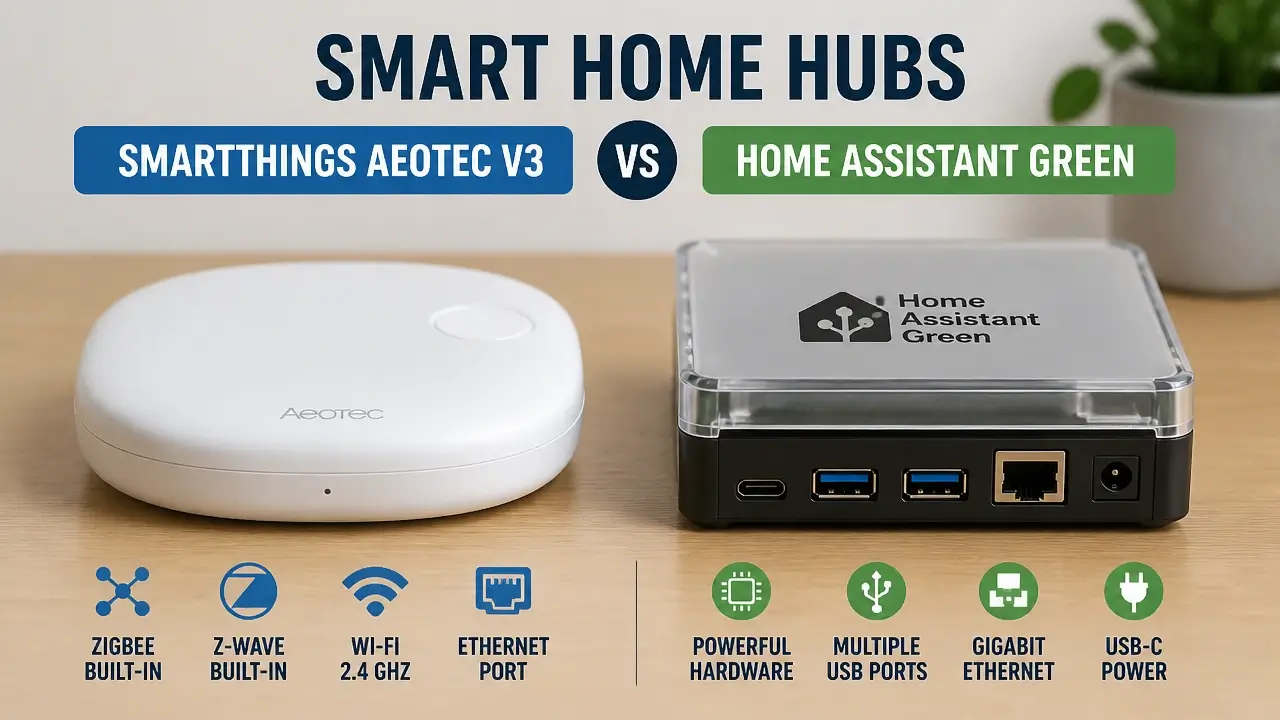
Time cost is a real expense and almost no one accounts for it. Community accounts consistently describe three to seven days of initial configuration for a functional Home Assistant setup, followed by weeks to months of iterative refinement before the system reaches a genuinely stable state. If your time is worth anything – professionally or personally – that’s a cost. SmartThings’ upfront time cost is measured in hours, not days. The inversion comes later: troubleshooting silent outage-induced failures and chasing broken integrations after forced updates accumulates hours of frustration over months and years.
Platform continuity risk is the cost most people forget to price in. SmartThings has a documented pattern of deprecating features: the original SmartThings app, the Groovy scripting environment, specific integrations, and device handlers have all been retired on SmartThings’ timeline, not yours. If you build a smart home on SmartThings and the parent company decides to sunset the platform or pivot the product, your investment migrates or evaporates. Home Assistant’s open-source foundation and contributor base make it effectively immune to that scenario – the code is public, the community is large, and no single company controls its future.
The real financial question isn’t “which hub costs less?” It’s “am I paying money upfront for independence, or am I paying with occasional loss of control and a potential migration cost later?” Both are legitimate choices. They just need to be made with open eyes.
Verdict: Which Platform Fits Your Smart Home – and Your Sanity
The right platform isn’t determined by which one has more integrations or better reviews. It’s determined by where you sit on two axes: your technical comfort with networking and configuration files, and the complexity of the smart home you’re actually trying to build.
Plot yourself honestly on both, and the answer gets clear fast.
SmartThings is the right choice for a household running 3–10 devices – lights, a lock or two, a thermostat, maybe a few sensors – where the goal is convenience with minimal ongoing involvement. If your household’s tolerance for technical friction is low, if “the lights just work” is the entire requirement, and if you’re genuinely okay with the occasional cloud outage as the price of plug-and-play simplicity, SmartThings still delivers that experience reliably. It’s not the future-proof choice, but it’s a legitimate one for a small, stable setup.
Home Assistant is the right choice for anyone comfortable flashing an SD card, editing a configuration file, or following a community forum guide through a two-hour setup session. If you want whole-home automation with multi-condition logic, energy monitoring, custom wall-panel dashboards, local voice control, and the certainty that your home keeps running when the internet doesn’t – Home Assistant is the only platform in this comparison that delivers all of that without a ceiling. The setup cost is real. The payoff is a system that grows with you indefinitely.
The hybrid path is the option that no official comparison documents but that the community has thoroughly battle-tested. Keep the SmartThings hub registered to your Zigbee and Z-Wave devices, strip it of all automation logic, and connect it to Home Assistant via the native SmartThings cloud integration. Home Assistant runs the automations; SmartThings serves as the radio bridge for devices you’ve already paired. This approach introduces cloud dependency for the bridge layer, but it eliminates the need to re-pair every device on day one and preserves your existing hardware investment while you learn the Home Assistant environment.
When you’re ready to cut the cord entirely, the graduation path is straightforward: plug a supported USB Zigbee coordinator into your Home Assistant machine, pair your devices directly to Zigbee2MQTT, and retire the SmartThings hub. Full local control, zero manufacturer lock-in, no SmartThings server in the chain.
Here’s a visual decision map that captures the full comparison – from architecture to persona fit – so you can see where you land before you buy anything:
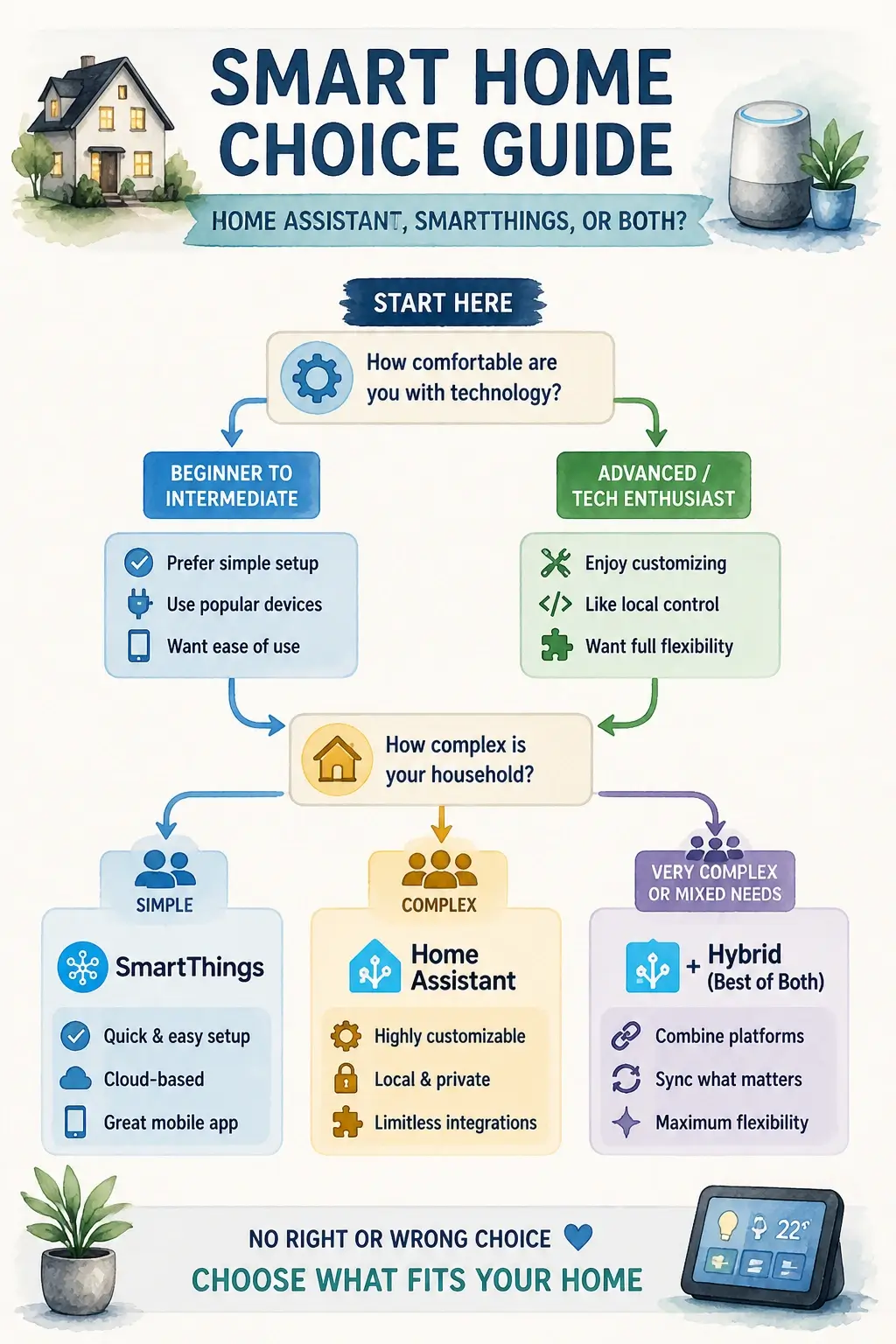
The decision heuristic is simple: if your household would genuinely fall apart when the lights don’t work during an internet outage, and you’re willing to invest 10–20 hours upfront to prevent that, go Home Assistant. If you need a clean app for a small apartment and you’re comfortable rebooting a hub once every couple of months while the company sorts out its servers, SmartThings still works – for now. Just go in knowing the difference.
Key Takeaways on Home Assistant vs SmartThings
- Home Assistant runs all automation logic locally on your own hardware; SmartThings routes automation decisions through Samsung’s cloud even when the hub is inches from your phone.
- A default Home Assistant install is not a fully private, offline system – weather cards, voice pipelines, and Nabu Casa all call external services unless you explicitly disable them.
- SmartThings reaches a stable basic setup in under an hour; Home Assistant typically takes three days to a functional core and months to a fully tuned system.
- Home Assistant exposes over 2,000 community integrations and full device attribute access; SmartThings offers a curated certification model that orphans unsupported devices when handlers aren’t rewritten.
- Over three years, Home Assistant’s Nabu Casa remote access subscription adds roughly $234 in recurring costs that SmartThings’ free cloud access doesn’t carry.
- Samsung’s pattern of deprecating features – Groovy, the original app, specific handlers – creates real platform continuity risk for SmartThings users that Home Assistant’s open-source model doesn’t share.
Frequently Asked Questions About Home Assistant vs SmartThings
Is SmartThings being phased out?
Samsung hasn’t announced a shutdown, but the platform has a documented history of deprecating major components – the Groovy scripting environment, the original SmartThings app, and specific integrations have all been retired without user consent. That pattern creates legitimate long-term uncertainty for anyone building a serious smart home on the platform.
Can you use Home Assistant with SmartThings at the same time?
Yes, and it’s actually one of the most practical intermediate paths. You can connect SmartThings to Home Assistant via the native cloud integration, using SmartThings as a Zigbee and Z-Wave radio bridge while Home Assistant handles all automation logic – though that bridge does reintroduce Samsung’s cloud into the reliability chain.
Does Home Assistant work without the internet?
Core automations, local device control, and dashboard access all work without an internet connection once Home Assistant is configured. The exceptions are integrations that call external APIs by design – weather services, cloud-based voice assistants, and the Nabu Casa remote access tunnel all require connectivity to function.
What happens to my SmartThings automations during a cloud outage?
They stop working. Even automations that appear to run locally on the hub still depend on Samsung’s cloud for orchestration logic, so a server outage typically means your routines don’t fire, your devices can’t be controlled remotely, and you have no visibility into what’s happening until the servers come back online.
Is Home Assistant actually free, or are there hidden costs?
The software is free and open source. The hidden cost is Nabu Casa at $6.50/month for convenient remote access – without it, remote access requires setting up a VPN or Cloudflare Tunnel yourself. Add in hardware ($99–175 for a dedicated device) and the time investment, and the true first-year cost is meaningfully higher than a $125 SmartThings hub.
What if I have Zigbee devices already paired to SmartThings – do I have to re-pair everything?
Not immediately, if you use the hybrid approach. You can connect SmartThings to Home Assistant via the cloud integration and run automations from Home Assistant while your devices stay paired to the SmartThings hub. When you’re ready to go fully local, Zigbee2MQTT lets you re-pair devices directly to a USB coordinator without needing to reset most of them.
Which platform handles Thread and Matter devices better?
Home Assistant has had native Matter support built into its core since late 2022 and actively develops it with each release. SmartThings added Matter support as well, but the depth of attribute access and local execution for Matter devices is more consistent on Home Assistant – particularly for devices that expose non-standard clusters.
Can a non-technical household member actually use Home Assistant day-to-day?
Yes, once it’s configured. The Lovelace dashboard and the companion mobile app are both genuinely polished for daily use. The complexity is front-loaded into setup and maintenance – tasks that typically fall to whoever set the system up, not the people living with it.
References
- SmartThings Edge Architecture and Local Execution – strathprints.strath.ac.uk
- PatrIoT: IoT Automated Interoperability and Integration Testing Framework – strathprints.strath.ac.uk