
Home Assistant vs SmartThings is, at its core, a question about where your home’s brain lives – on a server in a Samsung data center, or on a device sitting on your shelf. Most comparison guides treat this as a footnote. It’s actually the only thing that matters.
Get this architectural split wrong and you’ll spend two years debugging automations that fail silently, hitting ceilings you didn’t know existed, or rebuilding everything from scratch when a vendor kills a feature overnight. Get it right and you’ll build something that keeps working whether the internet is up or not.
What Actually Separates These Two Hubs
Cloud vs local control is the fault line that runs through every Home Assistant vs SmartThings comparison – and it’s worth being precise about what that actually means before looking at any feature. SmartThings executes most of its automation logic on Samsung’s cloud servers, which means your door lock responding to a sensor depends on a round trip to a data center. Home Assistant runs that same logic on a physical device inside your home, which means the round trip is measured in milliseconds across your local network, not across the internet.
That single architectural difference cascades into five real-world dimensions that will shape your daily experience: how quickly you can get devices talking, how broad your compatible hardware pool is, how deep your automations can go, who sees your data, and what the whole thing costs over a three-year horizon. Those are the filters this article uses – not a feature-count war.
Two important caveats before going further. First, “local” doesn’t automatically mean “offline.” A fresh Home Assistant install reaches out to cloud services constantly – weather integrations, voice assistants, remote access, notification services. The local advantage only materializes if you deliberately architect for it, and most users don’t. Second, SmartThings has genuinely moved some processing to the hub level through its Edge driver architecture. But setup, app control, and a significant portion of automations still depend on Samsung’s servers. The core architecture is still cloud-tethered.
Here’s how the two platforms compare across those five dimensions at a glance.
| Dimension | SmartThings | Home Assistant |
|---|---|---|
| Ease of Setup | App-guided wizard, no dedicated hardware required | Requires dedicated machine (Raspberry Pi, mini PC, or HA Yellow); manual integration setup |
| Device Breadth | Curated library; works out of the box for major consumer brands | 3,000+ integrations; nearly anything with an API or radio, including community HACS add-ons |
| Automation Depth | Visual “if this, then that” editor; limited rule complexity | YAML automations, Node-RED visual flows, Blueprints, template sensors, custom scripts |
| Data Privacy | Device states and logic processed on Samsung’s servers | All data local by default; optional Nabu Casa tunnel doesn’t expose data to Nabu Casa |
| Long-Term Cost (3 yr) | ~$125–$130 (hub only, no required subscription) | ~$340–$365 (hardware + optional Nabu Casa + USB coordinator + maintenance) |
The table makes the trade-offs visible, but it doesn’t explain why they exist. The sections below go one layer deeper.
Getting Your Devices Online
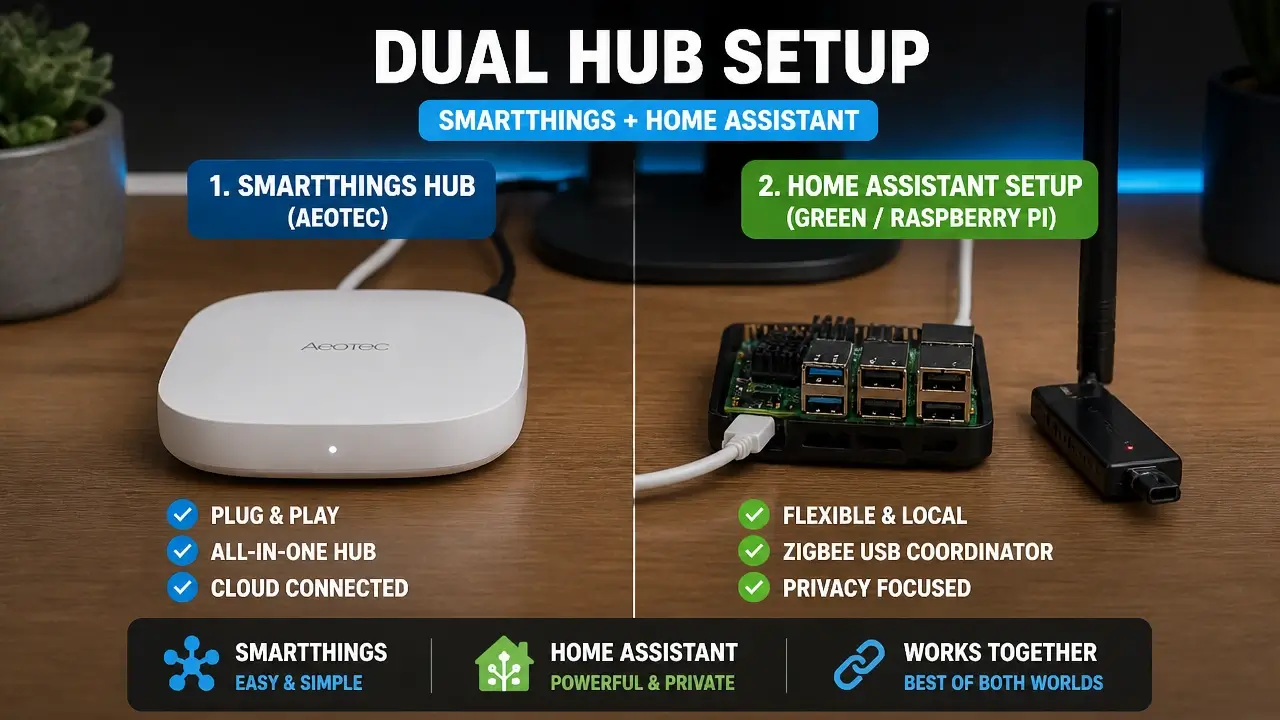
Device compatibility and setup process look different depending on which side of the platform divide you’re standing on – and the gap is wider than most people expect on day one. SmartThings ships with Zigbee and Z-Wave radios built into the hub, uses an app-guided wizard that discovers Samsung, Aeotec, and compatible Zigbee/Z-Wave devices in minutes, and requires no dedicated hardware beyond the hub itself. If you’re starting from zero with a bag of popular consumer devices, you’ll have things running the same afternoon.
Home Assistant takes a different path. You start by installing the OS on a dedicated machine – a Raspberry Pi, a mini PC, or the purpose-built Home Assistant Green or Yellow – then add integrations one by one through the UI or configuration files. Zigbee and Z-Wave work perfectly well, but they require an external USB coordinator (roughly $25–$40) unless you’re using the Yellow, which has a Zigbee radio onboard. The HACS community store extends the integration library to over 3,000 devices, including almost anything with an API, but many of those integrations involve YAML editing and occasional troubleshooting.
The practical difference isn’t “hard vs. easy” – it’s “guided vs. open.” SmartThings curates its device library so supported hardware just works. Home Assistant’s breadth is its superpower, but breadth means you’re responsible for the configuration.
Here’s what the setup path looks like in practice.
The setup experience is a one-time cost. The migration cost is not. If you build a mature SmartThings installation and later decide to move to Home Assistant, you’re not doing a software swap – you’re doing a project. One Facebook community thread captured this better than any spec sheet: the core migration took three days, followed by three months of troubleshooting edge-case automations. That’s the real decision you’re making on day one. Not “which is easier to set up” but “what does it cost me to change my mind in two years?”
Automation Depth: Can You Build a Home That Thinks?
Automation depth is where the philosophical split between these two platforms becomes a practical ceiling – and where most users eventually feel it. SmartThings gives you a clean visual editor for building routines. It works. For the majority of households running fewer than a dozen automations, it’s genuinely sufficient. The problem appears when your logic gets complex: multiple conditions, time-based overrides, sensor states that need to feed into each other, presence detection that accounts for multiple people. That’s where the platform’s expressiveness runs out.
Dr. Jin-Young Choi, a researcher at the School of Electrical Engineering at Korea University, put it plainly in a peer-reviewed analysis of the platform:
“SmartThings applications called SmartApps are written in the Groovy language, which is a dynamic object-oriented language, and are executed in the cloud… visual tools are good for simple programming, but they have limited expressiveness when it comes to writing large applications for home automation.”
The “executed in the cloud” part matters as much as the expressiveness limit. It means your automation’s reliability is a function of your internet connection’s reliability – a dependency that Home Assistant’s local engine doesn’t share.
SmartThings Rules vs. Home Assistant YAML and Node-RED
SmartThings Rules and Home Assistant YAML represent two genuinely different philosophies about what an automation engine should be. SmartThings offers a visual “if this, then that” editor and a Rule API for more structured logic – functional for simple routines, but constrained by design. Home Assistant gives you three overlapping tools: a YAML-based automation system for precise, scriptable logic; a Node-RED visual flow builder for those who prefer a graphical interface but want real complexity; and Blueprints, which let you import and share pre-built automation templates from the community.
The gap becomes concrete with a real example. Take a “good morning” routine that checks sunrise time, open window sensors, and whether anyone is actually home, then gradually raises the blinds, turns on lights at a warm color temperature, and nudges the thermostat. In SmartThings, this typically requires multiple separate routines, workarounds for the presence logic, and manual coordination between them. In Home Assistant, a single multi-condition automation handles the entire sequence natively, with fallback logic built in.
This video walkthrough shows what that transition from SmartThings to Home Assistant actually looks like in practice – including where the automation complexity gains become immediately visible.
Local Execution and Where the Ceiling Lives
Local execution changes the feel of a smart home in ways that latency numbers don’t fully capture. Home Assistant’s local engine processes automations in milliseconds – a motion-triggered light responds before you’ve finished stepping into the room. SmartThings routes many routines through the cloud, and while Samsung has improved local processing for some Edge driver-based automations, the cloud dependency remains real for others. For motion-triggered lights or entry-sensor alarms, that added round-trip latency is noticeable.
The ceiling on SmartThings is structural. Power users consistently hit the wall of its rule engine and have nowhere to go. Home Assistant’s ceiling is effectively nonexistent for practical home automation: template sensors let you derive new virtual states from combinations of real ones, custom scripts handle multi-step sequences, and Python injection is available for users who need to go even further.
Here’s the nuance that almost no comparison article mentions: Home Assistant’s local execution advantage isn’t automatic. A default install calls external APIs constantly – weather data, voice assistant endpoints, notification services, remote access through Nabu Casa. A truly local, internet-independent setup requires deliberately disabling or self-hosting each of those services: removing Google and Alexa integrations, blocking outbound internet at the router, and either dropping Nabu Casa or accepting that remote access reintroduces a cloud dependency. It’s absolutely achievable, but it’s a deliberate architectural choice, not a default. SmartThings users face the mirror image: they get weather data and remote access effortlessly, but their automations break when the internet drops. This is the real fork – convenience vs. sovereignty – and neither platform makes it obvious which side you’re standing on.
Privacy, Control, and the Cloud Dependency Trap
Cloud dependency and data privacy sit at the center of the Home Assistant vs SmartThings debate in ways that vendor documentation rarely surfaces. Dr. Sang-Hoon Lee of Gachon University’s Department of Smart Safety and Fire Technology described the stakes in a 2025 study on SmartThings’ Edge architecture:
“The SmartThings Edge architecture enables local execution of device logic on a hub-level controller, eliminating the dependency on cloud round-trips for time-critical operations-a crucial advantage for emergency response applications… unlike cloud-based systems, all inference is performed locally, eliminating network latency.”
The fact that Samsung needed to build Edge specifically to address cloud round-trip latency is itself the most honest description of what the original architecture looks like under load.
SmartThings’ Server Model vs. Home Assistant’s Local Control
SmartThings’ server model means that device states – when your door locked, when motion was detected, what temperature your thermostat is set to – are stored and processed on Samsung’s infrastructure. A 2016 security analysis published at the IEEE Security & Privacy Symposium found that the platform “hosts the application runtime on a proprietary, closed-source cloud backend” and that “devices and applications build secured channels like TLS to the cloud backend and delegate control to the cloud.” The cloud is the authority for device bootstrapping, command authentication, and access-right management. Every device state and command flows through Samsung’s servers.
That same analysis documented “overprivilege” in SmartApps – where applications receive full device access beyond what their stated function requires. A follow-up study from the USENIX Security Symposium evaluated 230 SmartThings market apps using a static taint-analysis tool and found that 60% included sensitive data flows, with no mechanisms for users to assess or control what was being transmitted. You get remote automation convenience; you relinquish local visibility into how your home’s state data moves.
Home Assistant’s posture is structurally different. No account is required to run the system. All data stays on your hardware by default. The optional Nabu Casa subscription – which enables remote access and voice assistant integration – uses an encrypted tunnel that routes commands without giving Nabu Casa visibility into your device states or automation logic. It’s a relay, not a data warehouse.
Groovy Deprecation and Open-Source Resilience
Groovy deprecation is the clearest historical evidence of what cloud dependency actually costs. In 2022, Samsung removed support for custom SmartApps written in Groovy – the scripting language that underpinned thousands of community-built automations. As covered at the time, users who had built complex automations over years had to rewrite everything using the new Edge driver framework or abandon that functionality entirely. Samsung made a business decision; users absorbed the consequences.
Open-source resilience works differently. Home Assistant is maintained by a global community, and its governance model means that if Nabu Casa – the company that funds development – disappeared tomorrow, the software would continue to exist, be forked, and be maintained by the community. The code is public. The architecture isn’t locked to any single company’s product roadmap.
The real decision axis here isn’t cloud versus local. It’s single-vendor dependency against community-maintained open standard. If you plan to live in your home for five or more years, the governance model of the platform you choose matters more than today’s feature list. That framing never appears in a vendor comparison guide – but it’s the one that ages best.
The Real Price of Independence
Long-term cost in smart home platforms is almost always undercounted, because the hardware sticker price is the only number that shows up in comparison articles. The full picture looks different.
Upfront Hardware and Recurring Subscription Costs
Upfront hardware cost lands close on both sides at first glance. The SmartThings Station runs $125; the Aeotec SmartThings Hub is around $130. On the Home Assistant side, the Green is $99 and the Yellow kit – which includes a Zigbee radio and PoE support – is $175. If you go with the Green or a custom Raspberry Pi install, add a Zigbee/Z-Wave USB coordinator at $25–$40.
The recurring subscription cost is where the gap opens. SmartThings requires no subscription for basic automations. Home Assistant’s Nabu Casa remote access runs $6.50/month ($65/year) – and for most users it’s functionally essential, because without it you lose remote control and voice assistant integration. Self-hosting those features is possible but adds meaningful complexity.
Here’s what a fair three-year total cost comparison looks like.
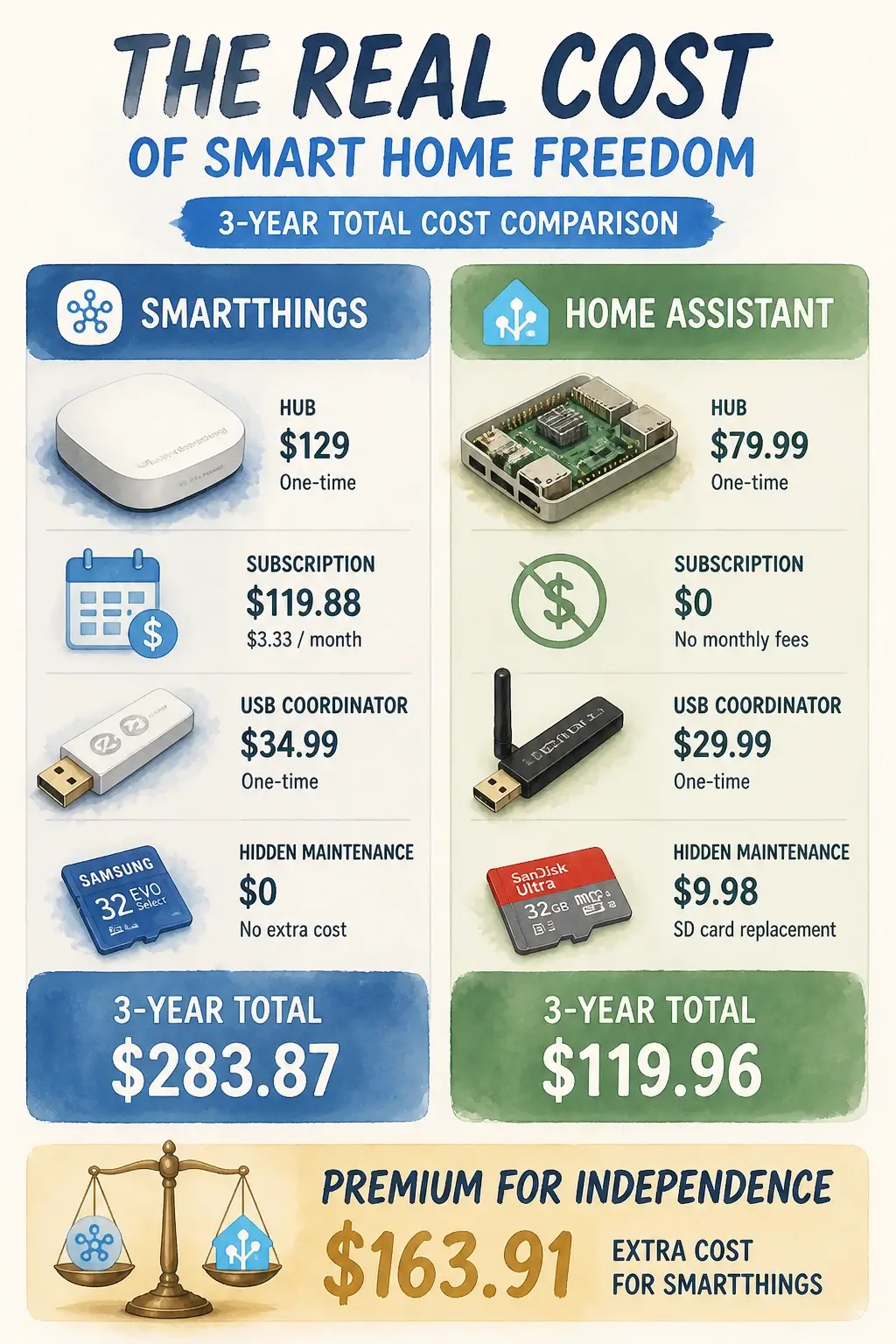
The “open source is cheaper” claim doesn’t survive this math. Over three years, SmartThings costs roughly $125–$130 in hardware with no required subscription. A Home Assistant Yellow setup with Nabu Casa, a USB coordinator, and one SD card replacement runs closer to $365. You’re paying a premium for independence – local control, data sovereignty, automation depth. Whether that premium is worth it depends entirely on how much those things matter to your household.
Hidden Maintenance and the Non-Monetary Cost
Hidden maintenance cost is the budget line that catches Home Assistant users off guard. Raspberry Pi-based installations write constantly to their SD cards – the Home Assistant database alone generates significant I/O – and SD cards under that workload typically need replacement every one to two years at around $15. Solid-state storage (a USB SSD or the eMMC on the Yellow) eliminates this, but adds to the initial hardware cost. These are small numbers individually; they add up when you’re doing honest accounting.
SmartThings’ non-monetary cost is harder to quantify but worth naming. The platform is free because Samsung monetizes the ecosystem data. Your device states, usage patterns, and automation triggers feed into a data model that has commercial value. For some users this is an acceptable trade. For privacy-conscious households, it’s a cost that doesn’t appear on any invoice but is real nonetheless.
Which Platform Actually Matches Your Life
The decision framework for Home Assistant vs SmartThings comes down to two variables that no spec sheet captures: your technical comfort level and your device count threshold – and there’s a third path for anyone already invested in SmartThings hardware.
Choose SmartThings if you have fewer than 20 devices, you want a reliable app-driven experience that doesn’t require ongoing maintenance, you have no need for deeply conditional automations, and you’re willing to accept cloud dependency as a reasonable trade for convenience. This is the right platform for renters, households where multiple non-technical family members manage devices, or anyone who wants smart home to function like an appliance – you configure it once and it runs.
Choose Home Assistant if you have more than 20 devices or plan to grow significantly, you need complex locally-executed logic that goes beyond “if this, then that,” you care about where your data lives and who can access it, and you’re prepared to invest a weekend in setup and a few hours per month in maintenance. The automation ceiling is effectively nonexistent, the community is large enough that almost any integration problem has already been solved, and the governance model means your investment survives vendor decisions.
The hybrid path is the most underused option, and it’s specifically valuable for existing SmartThings users who don’t want to throw away working hardware. SmartThings has a native Home Assistant integration, and for users who want more control, an MQTT bridge lets Home Assistant handle all automation logic while SmartThings continues managing low-level Zigbee and Z-Wave device communication. Your existing radios keep working; Home Assistant gains access to those devices and executes automations locally. This isn’t a beginner project – you’ll need a Mosquitto MQTT broker, careful topic mapping, and some networking patience – but it’s highly effective. It’s the “evolve rather than replace” path for anyone sitting on a mature SmartThings installation who keeps hitting the automation ceiling.
The qualitative answer is this: you’re not choosing between a good platform and a bad one. You’re choosing between plug-and-play reliability with cloud dependency and total authority with maintenance overhead. Your technical comfort and your long-term vision for the home – not the feature list – determine which trade-off you can actually live with.
Key Takeaways on Home Assistant vs SmartThings
- SmartThings runs automation logic on Samsung’s cloud servers; Home Assistant runs it on hardware you own inside your home.
- Home Assistant’s “local” advantage isn’t automatic – it requires deliberately disabling cloud integrations to achieve true local execution.
- The Groovy deprecation in 2022 proved that SmartThings users can lose years of custom automations overnight when Samsung changes its platform.
- A fair three-year total cost puts SmartThings at roughly $125 versus Home Assistant at $340–$365 when remote access and maintenance are included.
- SmartThings suits households under 20 devices who want app-driven reliability; Home Assistant suits those who need complex automations, privacy, and long-term platform sovereignty.
- Existing SmartThings users can run an MQTT bridge to gain Home Assistant’s automation depth without replacing their Zigbee/Z-Wave hardware investment.
Frequently Asked Questions About Home Assistant vs SmartThings
Is SmartThings being phased out?
Samsung hasn’t announced an end-of-life for SmartThings, but the 2022 Groovy deprecation showed the platform can kill core functionality with limited notice. The Edge driver architecture is the current development focus, but SmartThings’ roadmap is entirely at Samsung’s discretion.
Can you use Home Assistant with SmartThings at the same time?
Yes – Home Assistant has a native SmartThings integration, and a more advanced MQTT bridge setup lets Home Assistant handle automation logic while SmartThings manages Zigbee and Z-Wave device communication. It’s not a beginner project, but it’s a practical way to keep your hardware investment while gaining local automation control.
Is Home Assistant a Matter hub?
Home Assistant can act as a Matter controller, meaning it can commission and control Matter devices directly. It can also function as a Thread border router when paired with compatible hardware like the Home Assistant Yellow or a Silicon Labs dongle – but it’s not a dedicated Matter hub in the way a commercial product would be marketed.
Is Home Assistant worth the hassle for a non-technical household?
Honestly, probably not. If the household has one person who enjoys tinkering and can own the maintenance, it’s absolutely worth it. If everyone in the house needs to be able to troubleshoot independently, SmartThings’ app-driven experience will cause less friction day to day.
What happens to my SmartThings automations if Samsung’s servers go down?
Any automation that depends on cloud execution simply won’t run. Some Edge driver-based automations execute locally on the hub and survive an internet outage, but setup, app control, and cloud-dependent routines all stop working. This is the core reliability risk of a cloud-tethered architecture.
Does Home Assistant require a subscription to work?
No – Home Assistant runs fully without any subscription. The Nabu Casa subscription ($6.50/month) adds remote access and voice assistant integration, which most users find functionally essential. Without it, you’d need to configure your own VPN or reverse proxy for remote access.
Can Home Assistant integrations break after an update?
Yes, and this is one of the real maintenance costs. Community-built HACS integrations in particular can break when Home Assistant releases a major update, because they’re maintained by individual developers rather than the core team. Official integrations are more stable, but no platform is immune to update-related breakage.
Which platform handles Zigbee better?
Both support Zigbee, but through different mechanisms. SmartThings has a built-in Zigbee radio with a curated device list. Home Assistant uses Zigbee Home Automation (ZHA) or Zigbee2MQTT with a USB coordinator, which supports a broader device range – including many devices SmartThings won’t recognize – but requires more initial configuration.
References
- SmartThings Applications and Visual Programming Limitations – ScienceDirect
- SmartThings Edge Architecture and Local Execution – MDPI Applied Sciences
- Security Analysis of Emerging Smart Home Applications – IEEE Security & Privacy (Earlence.com)
- Sensitive Information Tracking in Commodity IoT – ACM / USENIX Security Symposium
- SmartThings Legacy Development Platform Deprecation – TheDigitalMediaZone
- SmartThings to Home Assistant Migration Overview – Glasp / YouTube