
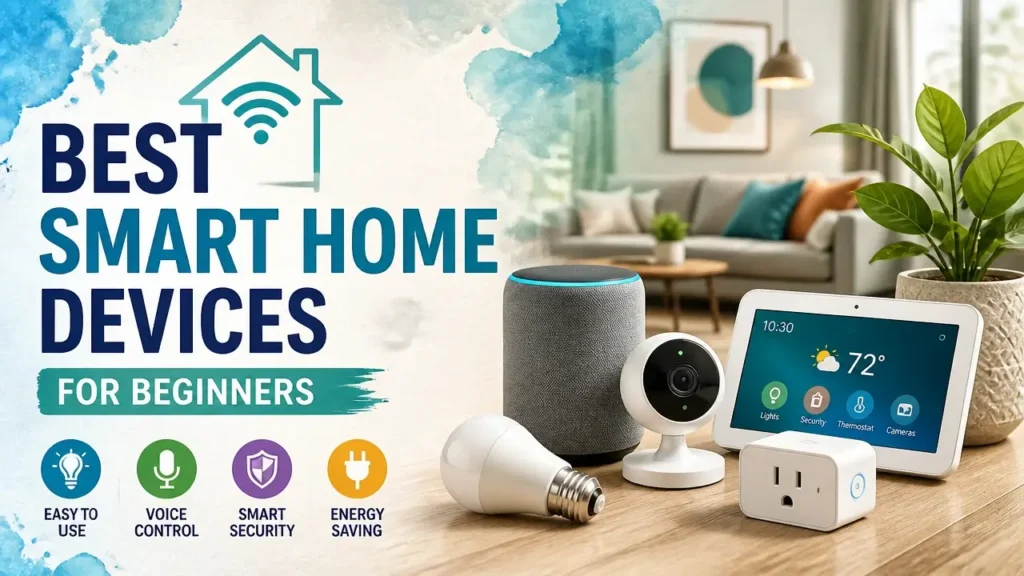
Well-chosen smart home devices don’t just respond to your voice – they keep your lights, sensors, and automations running whether your internet is up or not. That’s the difference between a setup built on local control and one that’s quietly hostage to a manufacturer’s server.
This guide skips the hype and hands you a proven, protocol-first path: a single Zigbee coordinator, a handful of devices under $35 to start, and a room that actually works the way a smart home should.
What Makes a Smart Home Device Worth Buying
Reliable smart home device selection comes down to three things: local protocol support, verified Home Assistant compatibility, and a setup process that doesn’t require a computer science degree. Get those three right and every device you add will cooperate instead of fight you.
Most beginner buying guides quietly skip the first criterion entirely – and that’s where new buyers get burned. A plug that needs a cloud app to function isn’t a smart home device. It’s a subscription you haven’t signed up for yet. The devices covered here clear all three bars, and the next two sections explain exactly why those bars exist.
Why Local Control and the Zigbee Protocol Landscape Matter
Local control means your lights, locks, and automations run on your own network – not on a server in another state. Your local control setup ensures your hallway light still turns on when you walk in, even if the cloud is down. When a manufacturer quietly sunsets their cloud service, your setup doesn’t go dark with it. Response time also stays near-instant: local commands execute in milliseconds, while cloud-routed commands can take a full second or more, which is noticeable every single time.
The protocol you choose determines whether local control is even possible. Here’s the plain version of the landscape:
Zigbee forms its own self-healing mesh network. Every mains-powered Zigbee device – a plug, a bulb, a switch – automatically repeats the signal to other Zigbee devices around it. The more devices you add, the stronger the mesh gets. Range and reliability improve together.
Z-Wave works on the same mesh principle and is arguably more robust in dense environments, but devices cost noticeably more and the selection is narrower. It’s a great long-term protocol – just not the most cost-effective starting point.
Wi-Fi-only smart plugs that require a manufacturer app are the enemy of a local setup. They live entirely in the cloud, they fragment your automation logic, and if the company folds, you own a dumb plug with a glowing LED.
The one piece of hardware Zigbee requires is a USB coordinator – a small dongle that plugs into your Home Assistant server and acts as the radio hub for all Zigbee devices. The Home Assistant SkyConnect and the Sonoff ZBDongle-E are the two most widely used options. One dongle, plugged into your Home Assistant Green or a Raspberry Pi, talks to every Zigbee device you’ll ever buy. No per-brand bridges, no stacking hubs on a shelf.
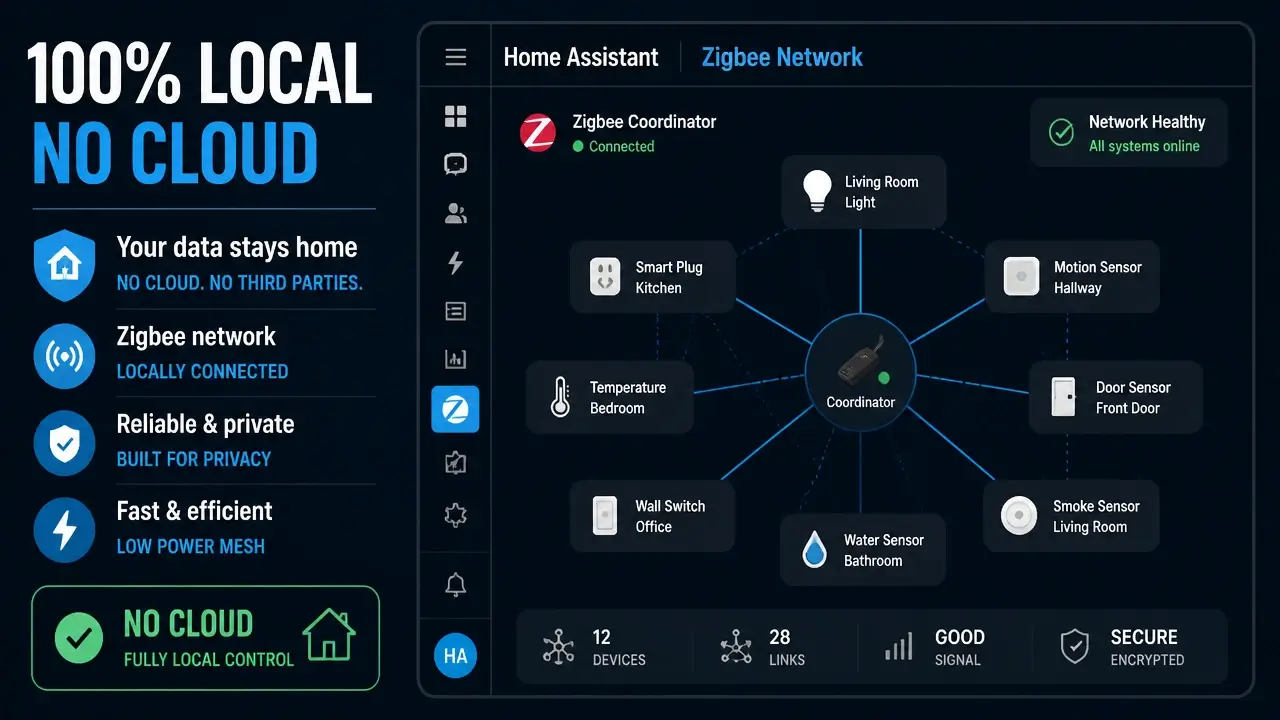
Here’s what a local Zigbee network map actually looks like inside Home Assistant – every device visible, every connection documented, all of it running on your own hardware.
The Starter Mindset: One Room, One Protocol
The “no extra hub” rule is non-negotiable for this list. Every device recommended here pairs directly with the Zigbee coordinator you already own. No IKEA gateway. No Philips Hue bridge. No Aqara hub. One dongle rules them all.
The starter mindset that actually works looks like this: pick one room, commit to one protocol – Zigbee – and master automations before you buy a second device. Beginners who try to cover the whole house in week one end up with a tangled mess of protocols, orphaned devices, and automations that half-work. Covering one room well is more satisfying and teaches you more than covering five rooms badly.
Pairing any device on this list should take under a minute. Open Home Assistant, go to Settings → Devices & Services → Zigbee Home Automation, click “Add Device,” put your device in pairing mode, and watch it appear. No YAML file. No terminal window. No tutorial video playing in another tab.
You’ll see plenty of buying guides recommend Matter devices for “future-proofing.” Here’s the honest version of that advice: Matter is promising, but for a beginner who wants a working local smart home today, it can steer you away from low-cost, immediately reliable Zigbee gear that already does everything you need. The enthusiast community is consistent on this – a single Zigbee dongle and devices that pair without extra hubs is the setup that works right now. This list is built for exactly that audience.
Sonoff Zigbee Smart Plug: Your First Automation Builder
The Sonoff Zigbee Smart Plug is the single best first device for anyone starting a local smart home – it costs around $15, teaches you the core “trigger → action” automation logic, strengthens your Zigbee mesh the moment you plug it in, and reports energy data fast enough to actually be useful.
Pair it directly with your Zigbee coordinator. No Sonoff app, no eWeLink account, no cloud. It shows up in Home Assistant as a switch entity with power monitoring – ready for automations before you’ve even walked back to your desk.
The repeater role matters more than most guides mention. Every mains-powered Zigbee device automatically acts as a signal repeater for every other Zigbee device nearby. So your very first plug isn’t just controlling a lamp – it’s strengthening the mesh network that every future sensor and bulb will rely on. Starting with a plug means your network gets more reliable as you add devices, not more fragile.
Your first automation takes about two minutes to build. Open the automation editor in Home Assistant, set the trigger to “Sun: Sunset,” set the action to “Turn on [plug entity],” add a second action at midnight to turn it off. No YAML, no code – just dropdowns and a save button. That’s the entire “trigger → action” loop that every more complex automation is built from.
Street price runs $15–20 depending on the variant (the Sonoff S31 Lite Zigbee and Third Reality Zigbee plug are both solid choices). Zero subscription fees. Zero cloud dependency after pairing.
One specification worth knowing before you buy any smart plug: energy reporting update interval. Many cheap Wi-Fi plugs only push power data every 15 seconds. On a short-burst load like a coffee maker or a toaster that runs for 90 seconds, a 15-second interval means you’re missing entire consumption cycles. The Zigbee plugs recommended here typically report every few seconds, which makes energy dashboards accurate enough to actually trust.
This is the spec that almost no mainstream buying guide mentions – and it’s the difference between an energy monitor you use and one you ignore.
Watch the pairing process and the sunset automation being built in real time:
Aqara Door & Window Sensor: Know When Doors Open Instantly
The Aqara Door & Window Contact Sensor turns any door or cabinet into a real-time notification trigger – it pairs over Zigbee, reports open/close state in under a second, and runs for roughly two years on a single coin cell without you thinking about it once.
The device is two small magnetic pieces: one sticks to the door frame, one to the door itself. When they separate, Home Assistant knows. When they reconnect, Home Assistant knows. The whole thing mounts with adhesive tape – no screws, no wiring, no tools.
The use cases are immediately practical. Get a push notification on your phone the moment the front door opens while you’re in the backyard. Trigger a chime on a smart speaker when a child’s medicine cabinet is opened. Log timestamps of every entry and exit for the past 30 days. All of that runs locally, with no cloud hop between the sensor and your phone.
Home Assistant recognizes the Aqara sensor instantly through both ZHA (Zigbee Home Automation) and Zigbee2MQTT – whichever integration you’re running. Battery status shows up as its own entity, so you’ll get a low-battery notification well before anything goes dark.
Price sits around $10–12 per sensor, which makes it the cheapest entry point on this list. Expected battery life is roughly two years on a CR2032 coin cell. Setup is genuinely three steps: peel the backing, stick it to the door frame, hold the reset button to pair. Done in under a minute.
Aqara Motion Sensor P1: The 5-Year Battery Sensor That Lights Your Way
The Aqara Motion Sensor P1 is a Zigbee passive infrared (PIR) detector that does one job exceptionally well – it tells Home Assistant the moment someone enters a room, fast enough that the light is on before you’ve taken a second step. What makes it the right choice for a beginner isn’t just detection speed; it’s a battery life figure that changes your maintenance math entirely.
Mount it in a corner, point it at the doorway, pair it with the Zigbee coordinator, and build the core automation: hallway light turns on for three minutes when motion is detected after sunset. No motion for three minutes, light turns off. You never touch a light switch in that hallway again.
The P1 pairs natively with Home Assistant through ZHA or Zigbee2MQTT. Sensitivity is adjustable from within Home Assistant – no app required. It also includes a built-in lux sensor, which means you can add a condition to the automation: “only trigger if ambient light is below 50 lux.” That single condition eliminates every accidental daytime trigger without any additional hardware.
Price runs approximately $18–22. Mounting options include a magnetic base or adhesive pad – no wall anchors needed.
Now, the battery figure: the Aqara P1 runs for up to five years on a single CR2450 cell. Independent practitioner reports across the Home Assistant community consistently back this number, and it dwarfs the six-to-twelve month replacement cycles that plague competing motion sensors. That’s not a minor convenience difference – it’s the difference between a sensor you forget about and one that becomes a quarterly chore.
Dr. Charles Gouin-Vallerand, Director of LIARA (Laboratoire d’Intelligence Ambiante pour la Reconnaissance d’Activités), puts the practical case for this class of device clearly:
“Each device can be powered by simple batteries while providing long-term functioning… The physical layer offered by this kit is a mesh network composed of both sensors and actuators that communicate with each other through the ZigBee protocol.”
That long-term functioning isn’t theoretical. The P1 is frequently cited in the Home Assistant community as an overlooked gem precisely because it combines five-year battery life, reliable Zigbee connectivity, and a price point well below premium alternatives. Set it up once and it earns its keep for years.
Aqara Temperature & Humidity Sensor: Keep Tabs on Every Room
The Aqara Temperature & Humidity Sensor is a compact, battery-powered Zigbee monitor that feeds real environmental data into Home Assistant – accurate enough to build automations around, cheap enough to put in every room you care about.
Once it’s paired, the sensor exposes three entities in Home Assistant: current temperature, current humidity, and battery level. All three are immediately available for dashboards, automations, and historical logging.
The automations this sensor enables are quietly powerful. Set an alert to fire if the nursery drops below 65°F overnight. Trigger a smart plug (connected to a dehumidifier) when humidity climbs above 60% in the basement. Log temperature curves over a week to figure out why one bedroom is always colder than the others. None of this requires the thermostat app, a subscription, or a cloud account.
Home Assistant stores historical data locally, so within a few days you’ll have trend graphs that show you exactly when each room heats up, cools down, or gets stuffy. That data starts informing smarter decisions about when to run fans, adjust vents, or crack a window – without any additional hardware.
Price is around $15. Battery life runs over a year on a standard CR2032. No hub required – it pairs directly to the Zigbee coordinator just like every other device on this list.
IKEA TRÅDFRI Smart Bulb: Local Lighting Without a Pricey Hub
The IKEA TRÅDFRI Smart Bulb is a Zigbee-based dimmable light that pairs directly with the coordinator you already own – no IKEA DIRIGERA hub, no Philips Hue bridge, no extra hardware at all – and it costs a fraction of what Hue charges for the same basic function.
TRÅDFRI bulbs come in two flavors: warm-white-only spectrum (around $12) and full color-ambiance (around $20). For most beginners, the white-spectrum version covers everything – on, off, dim, scene-based warmth. The color version adds flexibility if you want it, but it’s not necessary for a first room.
Pairing requires a small ritual: with the bulb in the socket, toggle the power switch off and on six times in quick succession. The bulb will blink to confirm it’s in pairing mode. Then open Home Assistant, add a new Zigbee device, and it appears within seconds. That’s the entire process.
A sample automation that runs entirely locally: at sunset, the bulb turns on at 2700K warm white and 60% brightness. At 10:30 PM, it dims to 20% for wind-down. At midnight, it turns off. No app open, no internet required, no voice command needed.
One thing worth knowing upfront: if IKEA releases a firmware update for the bulb, you can’t install it without temporarily connecting the bulb to an IKEA DIRIGERA hub or the older IKEA gateway. For basic on/off and dimming, the existing firmware works perfectly – this is a minor edge case, not a daily limitation. But it’s your call to make with full information.
Compare that to Philips Hue, which simply will not function at all without its hub, ever. TRÅDFRI paired directly to a Zigbee dongle is still the simpler, more local path – and it keeps your shelf clear of hardware you didn’t need to buy.
Google Nest Hub Max: The Voice Control Center (With a Cloud Catch)
The Google Nest Hub Max is a smart display with Google Assistant built in – and it’s the most honest recommendation on this list, because it’s also the only device here that can’t run locally. Understanding exactly what that trade-off means is more useful than pretending it doesn’t exist.
The integration path works like this: Home Assistant exposes selected devices to Google Assistant through either Nabu Casa (Home Assistant’s own cloud subscription, around $6.50/month) or a manual Google Cloud setup. Once connected, you can say “Hey Google, turn off the living room light” and the command routes from the Nest Hub → Google’s servers → Home Assistant → your Zigbee device. The local Zigbee leg of that journey is instant; the cloud leg adds latency and a dependency you can’t control.
The practical implication: your voice assistant’s cloud dependency means voice commands stop working when the cloud is down. Your local automations – the motion sensor, the door sensor, the plug – keep running without interruption. Voice is the one layer that goes quiet.
At around $230, the Nest Hub Max is the most expensive item on this list. What justifies the price is what it replaces: a separate smart speaker, a digital photo frame, a security camera, and a dashboard display – all in one device. If voice control is purely for you and you’re comfortable with a smaller footprint, a Nest Mini at around $30 does the voice job adequately.
The display earns its place in a family home because it gives non-technical household members a touchscreen interface that anyone can use without opening an app. For a beginner who wants their partner or kids to actually use the smart home, that accessibility matters more than the local-first purist in all of us would like to admit.
One honest note on long-term reliability: no reliable published data exists on long-term failure rates or warranty track records for voice-assistant hardware from any major brand. Treat the Nest Hub Max as a companion layer on top of your local setup – not the foundation of it. If Google’s service hiccups, your Zigbee mesh keeps the lights running exactly as programmed.
Your First Purchase Plan: What to Buy First and What to Avoid
A smart first purchase plan doesn’t start with the most exciting device – it starts with the two devices that immediately prove the concept, cost under $35 combined, and teach you everything you need to know before spending another dollar.
The goal for week one is simple: one room, one automation, zero wasted money. The devices below are sequenced so each purchase builds on the last, and the “what to avoid” section names the specific traps that derail most beginners before they ever get their first automation running.
The Exact Starter Kit and Expansion Path
Start with one Sonoff Zigbee Plug and one Aqara Door Sensor. Total cost: under $35. That’s your starter kit.
Here’s why this specific pair works as a first purchase: the plug gives you your first controllable device and strengthens the Zigbee mesh simultaneously. The door sensor gives you your first event trigger. Combine them and you have a real automation in under an hour – door opens, lamp turns on. Door closes for 10 minutes with no motion, lamp turns off. That single automation demonstrates the entire “trigger → condition → action” logic that every future automation is built from.
Once that room feels natural, expand in this order:
- Aqara Motion Sensor P1 – replaces the door trigger with passive presence detection. Lights respond to you walking in, not just to the door opening.
- IKEA TRÅDFRI Bulb – swap a lamp’s dumb bulb for a controllable one. Now you’re dimming and scheduling, not just switching.
- Aqara Temperature & Humidity Sensor – adds environmental awareness. Suddenly you’re automating a fan or getting freeze alerts, not just controlling lights.
- Google Nest Hub Max – buy this only when voice control becomes a household priority, not a personal curiosity. It’s the most expensive device and the only cloud-dependent one. Earn it.
The One-Room, One-Protocol Rule and What to Avoid
Stick to Zigbee across your entire first room. Don’t mix a Zigbee plug with a Wi-Fi bulb and a Z-Wave sensor in the same space. Mixing protocols fragments your automation logic, splits your device management across multiple integrations, and prevents the Zigbee mesh from building the density it needs to stay reliable.
Here’s what to skip entirely at this stage:
- Philips Hue starter kit – requires its own bridge, adds unnecessary hardware and cost, and the community asks “can these work without the Hue hub?” constantly. For a local-first build, the answer is no. TRÅDFRI is the cleaner path.
- No-name Wi-Fi smart plugs – any plug that requires a proprietary app and a cloud account is a liability. If the manufacturer’s server goes offline, you own a dumb plug. The 15-second energy reporting interval issue compounds this: cloud-reliant plugs report slowly and can fail entirely when servers go down. Zigbee plugs eliminate both problems.
- Smart switches without a neutral wire check – before buying any in-wall smart switch, open the wall box and confirm a neutral wire is present. Many older homes don’t have one, and installing a switch that requires neutral in a box without one results in flickering lights at best and a non-functional installation at worst.
Here’s a quick-reference view of everything recommended, side by side.
| Device | Protocol | Control | Approx. Price |
|---|---|---|---|
| Sonoff Zigbee Smart Plug | Zigbee | Local | $15–20 |
| Aqara Door & Window Sensor | Zigbee | Local | $10–12 |
| Aqara Motion Sensor P1 | Zigbee | Local | $18–22 |
| Aqara Temperature & Humidity Sensor | Zigbee | Local | ~$15 |
| IKEA TRÅDFRI Smart Bulb (white) | Zigbee | Local | ~$12 |
| IKEA TRÅDFRI Smart Bulb (color) | Zigbee | Local | ~$20 |
| Google Nest Hub Max | Wi-Fi | Cloud (Google) | ~$230 |
When you’re ready to go beyond this list, the SwitchBot Meter Pro CO₂ monitor is a natural next step – it adds air-quality intelligence to the environmental layer you’ve already built, and it’s consistently flagged by the community as an overlooked advanced sensor once the basics feel routine.
One final note that’s worth saying plainly: no published long-term reliability data exists for any of these consumer smart home devices. The best protection isn’t a warranty comparison – it’s buying from brands with large community footprints and accessible support. Every device on this list has thousands of active Home Assistant users behind it. That community is your real safety net.
Key Takeaways on Smart Home Devices
- Local control keeps your automations running during internet outages and cuts response time to near-instant.
- A single Zigbee USB coordinator replaces every manufacturer-specific hub on this list.
- Start with one Sonoff Zigbee Plug and one Aqara Door Sensor – under $35 and enough to build your first real automation today.
- The Aqara Motion Sensor P1’s five-year battery life on one CR2450 cell makes it the lowest-maintenance motion sensor in its price range.
- Mixing Wi-Fi plugs with Zigbee sensors in the same room fragments your automation logic and weakens your mesh network.
- The Google Nest Hub Max is the only cloud-dependent device on this list – treat it as a convenience layer, not a control backbone.
Frequently Asked Questions About Smart Home Devices
Do I need a Raspberry Pi to run Home Assistant, or are there simpler options?
You don’t need a Pi – the Home Assistant Green is a plug-and-play dedicated server that costs around $99 and comes ready to run out of the box. It’s the easiest entry point if you don’t want to configure hardware.
Can I add Zigbee devices from different brands to the same network?
Yes, Zigbee is an open standard, so an Aqara sensor, a Sonoff plug, and an IKEA bulb can all live on the same Zigbee coordinator without any compatibility issues. They’ll all appear as individual devices inside Home Assistant.
What happens to my automations if my Home Assistant server restarts?
Automations resume automatically when Home Assistant comes back online – they’re stored locally and don’t depend on any external service. Devices that were in a certain state before the restart will return to that state once the server reconnects.
Is Zigbee2MQTT better than ZHA for a beginner?
ZHA is built directly into Home Assistant and requires zero additional setup, which makes it the right starting point for most beginners. Zigbee2MQTT offers more advanced device control and broader device support, but it adds configuration complexity that isn’t necessary until you’ve outgrown ZHA’s capabilities.
Can I use these devices without a voice assistant at all?
Absolutely – every device on this list except the Nest Hub Max runs entirely through Home Assistant’s own interface, automations, and mobile app. Voice control is a convenience layer, not a requirement.
What’s the difference between Zigbee and Matter, and should I care right now?
Matter is a newer smart home standard built for cross-platform compatibility, but most Matter devices still rely on cloud bridges for full functionality today. Zigbee with a local coordinator is more mature, cheaper, and more reliably local for a first setup in 2025.
How many Zigbee devices can one coordinator handle?
Most coordinators like the Sonoff ZBDongle-E or Home Assistant SkyConnect can handle 50–100 directly connected devices, with hundreds more possible through the mesh. You’re unlikely to hit that ceiling in a single home.
Will my smart home still work if a manufacturer goes out of business?
If the device uses Zigbee and runs locally through Home Assistant, yes – it will keep working indefinitely because it doesn’t depend on the manufacturer’s server. This is the single biggest practical advantage of a local-first setup over cloud-dependent alternatives.
References
- LIPSHOK: LIARA Portable Smart Home Kit – MDPI