

Building an email list the right way separates marketers who own their audience from those who rent it – and the gap between those two positions shows up fast in deliverability scores, revenue per subscriber, and regulatory exposure. Most intermediate practitioners already know the basics. What they’re missing is the structural logic that connects tool selection, lead magnet design, confirmation flow, and segmentation into one system that compounds over time.
This guide skips the “email marketing is great” preamble. You’ll get the mechanics: what to set up before you run a single opt-in, how to design a lead magnet that earns the click, and how to protect the list you build so it doesn’t quietly decay into a liability.
What You Need Before You Start Building
Solid email list prerequisites determine whether every tactic you layer on top actually works – or quietly bleeds out. Before you touch a pop-up builder or write a single welcome email, three foundational assets need to exist: a place to capture leads, a system to hold them, and the legal cover to contact them.
Start with your website or landing page. Without a hosted page you control, there’s nowhere to embed an opt-in form. A standalone landing page built in your ESP works if you don’t have a full site yet, but you need something at a real domain.
Next, you need an ESP account. Mailchimp, Brevo, MailerLite, and Klaviyo are the most common entry points – each has a free tier, though the limits differ meaningfully. MailerLite’s free tier covers up to 1,000 subscribers with automation intact. Brevo’s free tier caps at 300 emails per day but doesn’t limit subscriber count. Mailchimp recently stripped marketing automation from its free plan, which matters if you intend to run any kind of welcome sequence from day one. HubSpot has a free CRM tier, but most list-building features sit behind paid plans – it’s not the right starting point for most practitioners here.
This is where the real cost-of-ownership question bites. Switching ESPs later – after you’ve built automations, connected integrations, and trained your audience on your sending patterns – costs hours and occasionally kills deliverability during the migration window. Choose a platform that supports automated double opt-in and DNS authentication (DMARC, SPF, DKIM) from the start. You won’t configure all of that today, but you need a platform that can do it. We’ll cover the technical setup in Step 5.
Two more non-negotiables before you launch anything: a privacy policy page and a terms of service page. GDPR requires that EU subscribers receive clear disclosure about how their data is used. CAN-SPAM requires that every commercial email include a physical postal address and an unsubscribe mechanism. These pages don’t need to be long, but they must exist and be linked from every opt-in form.
Finally, have your lead magnet asset ready – the actual file, video link, or tool – before you promote it. This forces you to build the thing instead of promising it. And if your site is brand new with near-zero traffic, the list-building tactics below won’t move the needle until you have at least a baseline of visitors arriving organically or through paid channels. Fix traffic first; then layer in capture.
As Carmen Cristofol Rodríguez, a leading digital marketing researcher specializing in digital sales funnels, frames it:
“The flow, as mentioned, begins with a welcome message, in which the user is encouraged to enter their email to receive notifications about offers and promotions from the company. In this way, the lead magnet is implemented from the beginning of the user’s interaction with the company.”
That sequence – traffic arrives, lead magnet triggers, welcome flow begins – only works when the infrastructure underneath it is already in place. Building that infrastructure is the unglamorous prerequisite that makes everything else compound.
Step 1: Why Buying a List Always Fails
A purchased email list is a pre-compiled set of addresses sold commercially, usually scraped from public sources or harvested without individual consent. The pitch is speed: skip the slow build, get thousands of contacts overnight. The reality is that you’re buying a liability, not an asset.
The legal exposure alone should stop you. Sending commercial email to EU addresses without documented prior consent violates GDPR – fines reach €20 million or 4% of global annual turnover, whichever is higher. In the US, CAN-SPAM requires that recipients have a prior relationship or explicit permission; purchased lists satisfy neither. The “I didn’t know they were EU-based” defense doesn’t hold.
The deliverability damage is equally immediate. When your domain suddenly sends email to thousands of addresses it’s never contacted before, ISPs treat it as anomalous behavior. Spam filters flag the volume spike. Your domain reputation drops. And once it drops, even the emails going to your legitimate subscribers start landing in spam – which means the list you worked to build organically gets poisoned by the shortcut you took.
The engagement numbers confirm it. Open rates on purchased lists typically sit below 5%. Click rates hover near zero. Spam complaint rates frequently exceed 0.1% – the threshold at which ISPs like Gmail and Yahoo begin throttling your sends. Cross that line and you’re not just underperforming; you’re actively destroying the infrastructure you need for everything else.
The table below shows how these two approaches stack up across every metric that actually matters:
| Metric | Purchased List | Permission-Based List |
|---|---|---|
| Deliverability | Poor – ISPs flag unknown senders | Strong – established sender reputation |
| GDPR/CAN-SPAM Compliance | Non-compliant – no documented consent | Compliant – explicit opt-in on record |
| Average Open Rate | <5% | 18–30% (industry average) |
| Spam Complaint Rate | Often >0.1% (ISP threshold) | Typically <0.05% |
| Long-Term ROI | Negative – domain damage, fines, zero trust | Positive – compounds with list quality |
The contrast isn’t subtle. Permission-based list building means every subscriber explicitly requested your content. That consent is what survives regulation changes, ISP algorithm updates, and inbox competition. It’s the only foundation worth building on.
One more thing worth naming: the growing consensus that email is the ultimate owned channel sometimes gets used to justify desperate growth tactics. It’s true that email is more durable than social reach – but that durability only holds for engaged lists. SMS and push notifications are becoming legitimate complementary owned channels, and building your email list as the backbone of a multi-channel owned strategy is a smarter long-term frame than treating email as the only thing worth protecting.
The pivot is simple: instead of buying attention, build a mechanism that earns it – and that mechanism is a lead magnet.
Step 2: Design a Lead Magnet That Makes Your Best Prospects Act
A well-designed lead magnet is a specific, value-dense asset that solves one immediate, concrete problem in exchange for an email address – and “immediate” is doing the most work in that sentence. Vague value propositions (“Get our free guide to marketing”) don’t convert. Tight, specific promises do.
Three psychological triggers determine whether a lead magnet earns the opt-in:
- High perceived value: The subscriber should feel like they’re getting something worth paying for.
- Low time-to-consume: They need to believe they can use it today, not after a 90-minute read.
- Extreme specificity: “5-Minute Email Audit Checklist” outperforms “Email Marketing Guide” every time, because specificity signals that you understand the exact problem they’re trying to solve right now.
Format matters more than most guides admit. Generic PDFs are losing ground to formats that feel immediately useful. In 2024 and into 2025, the formats that consistently outperform are:
- Interactive quizzes built with tools like TryInteract – they personalize the experience and segment the subscriber at the same time.
- Proprietary Notion templates that the subscriber can duplicate and use in minutes.
- 3-part mini video courses delivered via automation – high perceived value, low production cost once built.
- Plug-and-play swipe files – copy-ready frameworks the subscriber can deploy the same day.
The format decision isn’t universal. SaaS audiences gravitate toward tools and templates. E-commerce audiences respond to quizzes and discount hooks. Service businesses convert better on mini-audits or case-study summaries. Match the format to the audience’s job-to-be-done, not to what’s easiest for you to produce.
One technique that separates intermediate from advanced: add a single strategic dropdown to your opt-in form asking for job role or biggest pain point. This lets you route the subscriber to the most relevant lead magnet variant and feed them into the right segmentation track later – without adding friction that kills conversion. One extra field, used correctly, is a segmentation engine.
Here’s a visual reference for what a high-converting lead magnet checklist looks like in practice:
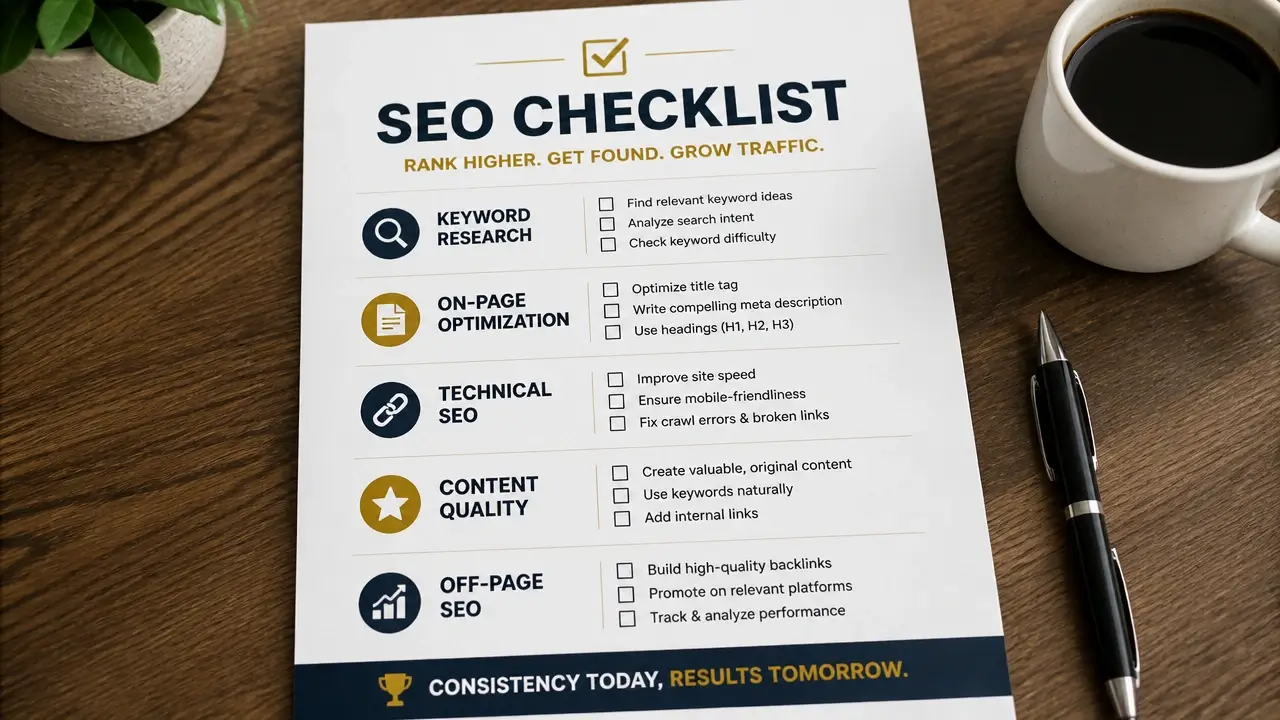
The conversion benchmarks that most guides skip: SaaS landing pages on cold traffic typically convert at 2–5% for opt-ins. E-commerce pop-ups with exit-intent and product-matched offers can reach 3–8%. These numbers come from practitioner observation, not large-scale studies, but they’re a useful diagnostic. If you’re below the lower bound, the problem is usually the specificity of the lead magnet or the match between offer and audience. If you’re above the upper bound, verify you’re not pulling in low-quality sign-ups that will drag down engagement metrics later.
The final requirement: your lead magnet must directly preview the value of your core offering. A mismatch here – a free “social media checklist” attracting subscribers to an email marketing service – creates a list full of people who were never your real prospect. They’ll open once, disengage, and eventually become the dead weight you’re paying your ESP to store.
Step 3: Place Opt‑In Forms Using a Behavioral Architecture
Smart opt-in form placement isn’t about putting a form everywhere and hoping – it’s about appearing at the exact moment a visitor’s intent aligns with your offer. The difference between a 1% opt-in rate and a 5% one is usually placement logic, not design.
A three-tier hierarchy gives you the structure to think about this systematically.
Tier 1 – Inline content upgrades: These are forms embedded mid-article, offering a resource that directly extends what the reader just consumed. A post about email subject lines with a mid-page opt-in offering a “50 Subject Line Swipe File” converts because the intent is already established. This is your highest-intent placement.
Tier 2 – Exit-intent overlays: Deploy these only on high-commercial-intent pages – pricing pages, checkout flows, and your top-performing blog posts. Not sitewide. An exit-intent pop-up on a casual “about us” page is noise. On a pricing page, it’s a last chance to capture someone who was genuinely considering you. The two-step opt-in technique amplifies this: instead of showing open form fields immediately, show a single button (“Get the Checklist”). When the visitor clicks it, the fields appear. That first click is a micro-commitment that psychologically increases the likelihood of completing the form.
Tier 3 – Sticky bars and footer forms: These are passive capture mechanisms for visitors who aren’t ready to act but aren’t leaving either. They work for brand awareness and low-friction opt-ins, but don’t expect high conversion rates here.
On timing: delay scroll-based pop-ups until the visitor has reached 50–60% page depth. Triggering at 10% scroll depth means you’re interrupting someone who just arrived and hasn’t decided whether your content is worth their time. Data from Klaviyo and similar platforms consistently shows that deeper-scroll triggers produce higher-quality opt-ins even when raw conversion volume dips slightly.
Progressive profiling is the technique that lets you gather richer subscriber data over time without front-loading a five-field form. On the first interaction, ask only for an email. On a second form interaction – a different content upgrade, a webinar registration – ask for one more data point: company size, role, or primary goal. Build the profile gradually rather than demanding it upfront.
One constraint worth naming explicitly: on mobile, Google penalizes interstitials that cover the main content on landing pages. Use smaller slide-ins or notification-style bars on mobile rather than full-screen overlays. This isn’t just a user experience preference – it affects your search rankings.
A word on the benchmarks circulating in this space: you’ll see claims of “15% pop-up conversion” or “35% exit-intent recovery” in a lot of marketing content. Those numbers don’t trace back to any primary research. Treat them as anecdotal ceilings, not targets. The only universally reproducible result is this: moving from single opt-in to double opt-in, combined with exit-intent CTAs on the right pages, consistently improves list quality. The exact lift depends on your audience, your offer, and your copy – which is why A/B testing CTA copy and trigger timing beats chasing any benchmark.
Step 4: Build a Confirmation Flow That Converts and Complies
Double opt-in confirmation is the checkpoint between a form submission and an active subscriber – and it’s doing more work than most practitioners give it credit for. Here’s the mechanism: when someone submits their email, your ESP automatically sends a confirmation email with a single link. Until that link is clicked, the address stays off your active list. Only verified, intentional subscribers get through.
That filter is a deliverability asset. It eliminates bot submissions, typo addresses, and people who clicked “subscribe” on impulse and would never open another email. Every address that clears the double opt-in is a real person who confirmed twice that they want to hear from you. That intent shows up in your open rates, your spam complaint rate, and ultimately in how ISPs score your domain.
On the legal side, GDPR requires explicit, documented consent for any EU subscriber. That means two things in practice: first, you must store a timestamped consent record for each subscriber – your ESP should handle this automatically, but verify that it is. Second, the request for marketing consent must be separate from your terms-of-service acceptance. A pre-checked box bundled with a “I agree to the terms” checkbox doesn’t satisfy GDPR. It needs to be its own unchecked box with clear language about what the subscriber is agreeing to receive.
CAN-SPAM has a different but overlapping set of requirements. Every commercial email must include a physical postal address (a PO box is acceptable), a clear and functional unsubscribe link, and accurate “from” information. Unsubscribe requests must be honored within 10 business days. These aren’t optional hygiene – they’re the baseline that keeps you out of enforcement territory.
The confirmation email itself is a micro-conversion opportunity. Write it to do three things: restate what the subscriber is about to receive (so they remember why they signed up), include a single large CTA button to confirm, and set a delivery expectation (“Your welcome email arrives tomorrow morning”). Keep the copy warm and specific. A generic “Please confirm your email” subject line gets ignored; “One click to get your [Lead Magnet Name]” connects the action to the reward.
Every email you send – not just the confirmation – needs a one-click unsubscribe link in the footer. This isn’t only a compliance requirement; it’s a deliverability signal. Subscribers who can’t find the unsubscribe link hit “report spam” instead, and that complaint damages your sender reputation far more than an unsubscribe would.
Now, the part that most guides skip entirely: before you send a single confirmation email, your domain authentication records need to be configured. DMARC, DKIM, and SPF are DNS-level records that tell ISPs like Gmail and Yahoo that your ESP is authorized to send email on behalf of your domain. Without them, your confirmation emails get throttled or blocked before they ever reach the inbox – which means your double opt-in flow is broken at the first step. We’ll cover the exact configuration in the next section.
Step 5: Secure Deliverability and Drive Long‑Term ROI with Segmentation
Email list sustainability depends on two systems running in parallel: the technical infrastructure that gets your emails into inboxes, and the behavioral logic that keeps the right people engaged once they’re there. Most practitioners build one without the other. The ones who build both are the ones whose lists compound.
Email Authentication Protocols: DMARC, DKIM, and SPF
Solid email authentication protocols adherence is the technical foundation that ISPs use to decide whether your emails deserve inbox placement – and it’s misconfigured or missing on more sending domains than you’d expect. The three protocols work together: SPF tells ISPs which mail servers are authorized to send on your domain’s behalf; DKIM adds a cryptographic signature to each email that proves it wasn’t altered in transit; DMARC ties both together and instructs ISPs on what to do when either check fails.
Here’s how to configure them. In your ESP, navigate to the domain authentication or “sending domains” section. Your ESP will generate DNS TXT records for SPF and DKIM – copy those exactly and add them to your domain registrar’s DNS settings (GoDaddy, Namecheap, Cloudflare, wherever your domain lives). For DMARC, create a new TXT record at `_dmarc.yourdomain.com` with a policy like `v=DMARC1; p=quarantine; rua=mailto:yourreportingemail@yourdomain.com`. Start with `p=quarantine` rather than `p=reject` until you’ve confirmed all your legitimate sending sources are authenticated. Validate all three using MXToolbox – it’s free and will flag any misconfiguration.
Dr. Salim KAYA, a Doctor of Computer Engineering and lead technical researcher on network security and sender authentication, explains the underlying mechanism:
“But, Domain Keys Identified Mail (DKIM), Sender-ID framework and Sender Policy Framework (SPF) can be classified in origin based filtering techniques as sender authentication, and in these techniques Domain Name System (DNS) is used for authentication.”
In plain terms: ISPs use your DNS records to verify you are who you say you are. No authentication, no trust. No trust, no inbox.
Your three core deliverability thresholds to monitor are: bounce rate below 2%, spam complaint rate below 0.1%, and inbox placement above 95%. If any of those drift, authentication and list hygiene are the first places to look.
For list hygiene, use API-based email verification – ZeroBounce, Twilio SendGrid’s Mail Validation, or your ESP’s built-in tools – before addresses enter your active list, and run a full validation pass on your existing list every 90 days. Role-based addresses like `info@` and `admin@` should be filtered out automatically; they rarely belong to engaged individuals and inflate your bounce risk.
Here’s a walkthrough of the DMARC, SPF, and DKIM setup process if you want to follow along visually:
One benchmark that’s absent from most guides: a healthy organic list typically grows at 3–5% month-over-month for an established site. That figure comes from practitioner consensus rather than a formal study, but it’s a useful diagnostic. Growth below 1% means revisit your lead magnet and placement. Growth above 10% warrants a check for bot sign-ups inflating the numbers.
Behavioral Segmentation for Sustained List Engagement
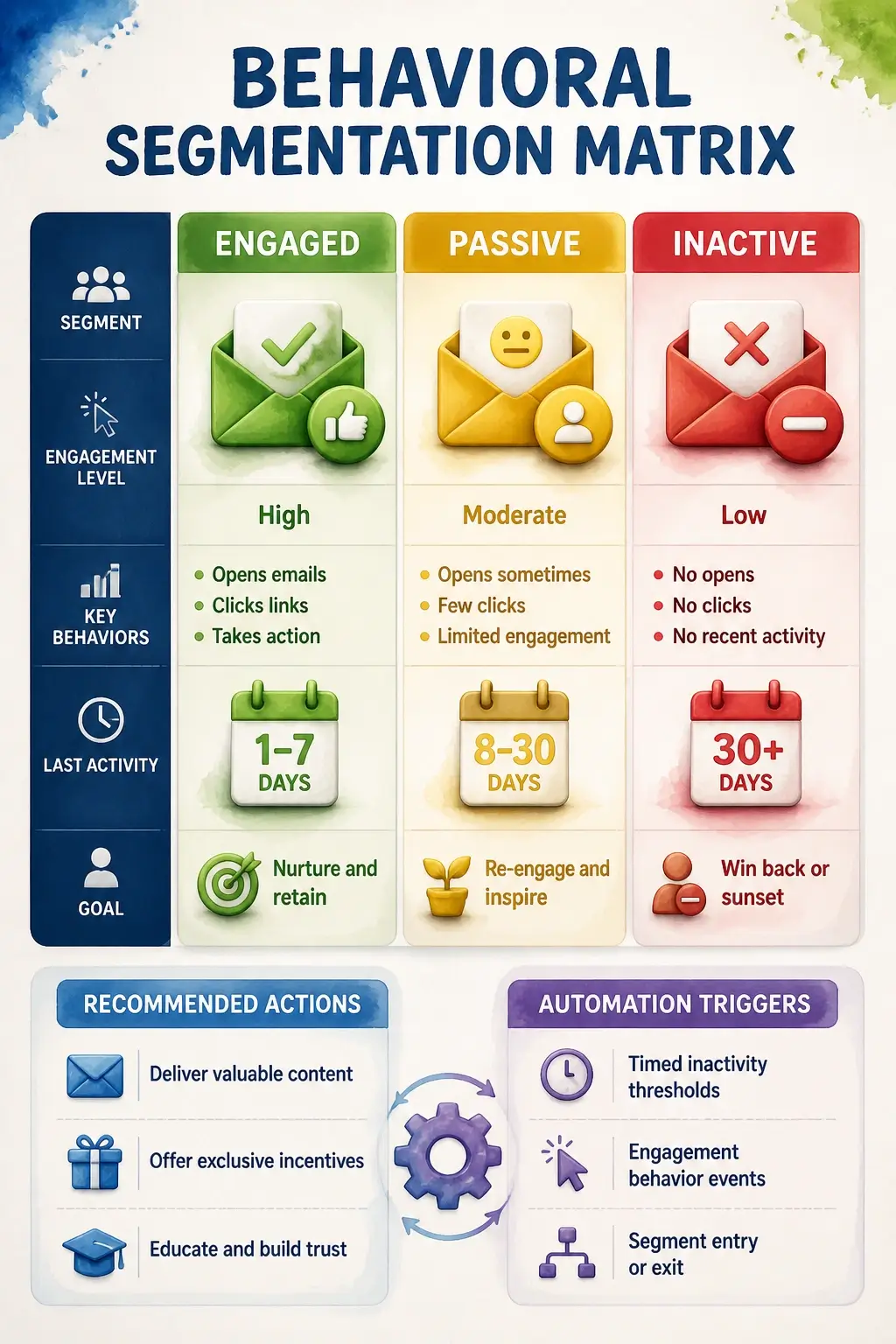
Behavioral segmentation is the engine that converts a deliverable list into a profitable one – because sending the same email to every subscriber at the same frequency is the fastest way to train your engaged subscribers to stop opening. The logic is simple: people who behave differently should receive different emails.
A workable segmentation matrix has four tracks:
- Engaged (opens + clicks): These are your best subscribers. Send them everything, and you can afford to increase frequency slightly without damaging relationship or deliverability.
- Passive (opens, no clicks): They’re reading but not acting. Send your strongest content, reduce frequency, and test different CTAs. Don’t abandon them – they’re still warm.
- Inactive (no activity in 60+ days): Move them into a re-engagement sequence automatically. Three emails over 30 days, each with a clear “still want to hear from us?” CTA. If no response, unsubscribe them. A smaller engaged list outperforms a large dead one in every metric that matters.
- Lead-source segments: Subscribers who came through paid ads have different expectations and context than those who found you through an organic blog post. Separate them. The messaging that converts one often confuses the other.
This is also where the tool-selection decision from the prerequisites section comes back around. Free tiers on most ESPs limit automation workflows – and the sunset policy and segmentation logic described here require automation. If your current plan doesn’t support multi-step conditional automations, you’ve hit the ceiling that makes migration necessary. Better to know that now than after you’ve built a list that outgrows your toolset.
The deliverability payoff of good segmentation is direct: when you only send to people who are likely to engage, your open rates and click rates go up. ISPs read those signals as evidence that you’re a wanted sender, which improves inbox placement for your entire list – including the segments you haven’t emailed yet.
Troubleshooting: Fix Open Rates, Complaints, and List Decay
List health diagnostics work best when you match the symptom to the root cause before you start changing things. The most common mistake is optimizing the wrong variable – redesigning your pop-up when the real problem is authentication, or A/B testing subject lines when the list hasn’t been cleaned in six months.
Here’s the symptom-to-cause map:
- Low open rates (<15%): Subject lines are too salesy or generic; inbox placement has failed (check whether your own emails land in spam); list hasn’t been cleaned; or subscribers never engaged in the first place because double opt-in wasn’t in place.
- High spam complaint rate (>0.1%): Lack of documented consent, a confusing or broken unsubscribe link, unexpected email frequency, or purchased-list residue still in the database.
- High bounce rate (>2%): No real-time email validation at sign-up, role-based addresses (`info@`, `admin@`) on the list, or a large batch of addresses that have gone stale.
- Low click-through rate (<1%): The content doesn’t deliver what was promised at sign-up, or segmentation is absent and you’re sending the same email to audiences with different needs.
The fix hierarchy matters more than most guides acknowledge. Attack in this order:
- Verify DMARC, DKIM, and SPF records first. If authentication is broken, everything downstream is compromised. Run a check on MXToolbox before you touch anything else.
- Run a full list cleaning with a validation tool. Remove hard bounces, role-based addresses, and unverified contacts.
- Audit your last five subject lines for spam-trigger words (free, guarantee, act now, no obligation) using a tool like Mail-Tester or your ESP’s built-in spam checker.
- Confirm the unsubscribe link works across Gmail, Outlook, and Apple Mail. A broken unsubscribe link is a direct path to spam complaints.
- A/B test subject lines and send times once the infrastructure is clean. A 2–3% lift in open rate on a list of 5,000 is 100–150 additional opens per send – that’s significant at scale. Test one variable at a time.
If you’ve paused sending for several weeks, your IP or domain needs re-warming. Start by emailing only your most engaged segment – the people who opened and clicked within the last 30 days. Send to them for a few days, let the positive engagement signals accumulate, then gradually layer in your passive segment over one to two weeks. Don’t blast your full list after a long silence; the sudden volume spike looks suspicious to ISPs even if every address on it is legitimate.
For a list that’s showing flat engagement across the board, the nuclear option is a 3-email re-engagement campaign. Make the stakes clear: “We’re cleaning our list – click here to stay on it.” After the third email with no response, remove those subscribers entirely. It feels counterintuitive to shrink the list you worked to build, but the math is straightforward: a list of 2,000 engaged subscribers with a 28% open rate outperforms a list of 8,000 with a 6% open rate in revenue, deliverability, and domain reputation.
The success standard that ties this whole system together: a healthy list runs above 18% open rate, above 2% click-through rate, below 2% bounce rate, and below 0.1% spam complaint rate. Hit those four numbers consistently and your list is a durable, compounding revenue asset – not a liability waiting to surface.
Dr. Piotr Będkowski, a machine learning expert and lead researcher on automated email campaign analysis and mail server deliverability, frames the diagnostic imperative precisely:
“The purpose of using the proposed models is to evaluate an email campaign (or a set of transaction emails) and identify bad cases. Since the bad label is associated with negative phenomena such as hard and soft bounces, users complaints, or resignations, it can be identified with the problem of detecting emails that we qualify as spam or phishing.”
That’s the practitioner’s lens: treat every campaign as a diagnostic event. The metrics aren’t just performance indicators – they’re signals about the health of the entire system underneath. Building the list is the beginning. Protecting the infrastructure is what turns it into consistent revenue.
Key Takeaways on Build an Email List
- Choose an ESP that supports double opt-in and DNS authentication from day one – switching later costs hours and risks deliverability during migration.
- Purchased email lists violate GDPR and CAN-SPAM, destroy domain reputation, and produce open rates below 5% with spam complaints that trigger ISP throttling.
- A lead magnet converts best when it solves one specific problem instantly – interactive quizzes, Notion templates, and swipe files outperform generic PDFs in 2024–2025.
- Opt-in forms placed at 50–60% scroll depth and on high-intent pages produce higher-quality subscribers than sitewide pop-ups triggered at page load.
- DMARC, DKIM, and SPF must be configured before your first confirmation email sends – without them, ISPs throttle your emails before any subscriber sees them.
- A list with 2,000 engaged subscribers at 28% open rate outperforms 8,000 disengaged contacts at 6% in revenue, deliverability, and domain reputation.
Frequently Asked Questions About Build an Email List
How many subscribers do you need before email marketing becomes worth the effort?
There’s no universal floor, but a list of 300–500 verified, engaged subscribers can generate meaningful revenue if the segmentation and offer match is right – size matters far less than engagement quality. Focus on hitting the 18% open rate benchmark before worrying about raw subscriber count.
Can you build an email list without a website?
Yes – a standalone landing page hosted directly in your ESP (MailerLite, Brevo, and others offer this on free tiers) gives you a real URL where opt-in forms can live. You don’t need a full website to start capturing leads, but you do need a hosted page at a real domain to run authentication records.
What’s the actual difference between single opt-in and double opt-in for a small list?
Single opt-in adds the address immediately; double opt-in requires a confirmation click first. For a small list, the short-term volume difference feels significant – but double opt-in eliminates bots, typos, and low-intent sign-ups that would drag down your open rate and eventually trigger spam filters. The quality trade-off is worth it from day one.
How often should you email a new subscriber in the first 30 days?
A welcome sequence of 3–5 emails over the first 10–14 days is the practitioner standard – frequent enough to establish the habit of opening your emails, spaced enough to avoid feeling like a flood. After the welcome sequence, match frequency to your content cadence rather than an arbitrary schedule.
What happens to your sender reputation if you import a cold list from an old CRM?
Importing a list that hasn’t been emailed in 12+ months is effectively a cold list – deliverability risk is real. Run it through a validation tool first, remove any address inactive for over a year, and re-warm by emailing only the most recently active contacts before expanding to the full import.
Does list size affect which ESP tier you actually need?
Yes, and it’s worth calculating before you start. Most free tiers cover up to 500–1,000 subscribers, but the real ceiling is automation: free plans on Mailchimp no longer include automated sequences, which means you can’t run a welcome flow or sunset policy without upgrading. Check automation support before subscriber count when evaluating tiers.
Can lead magnets hurt your list quality if they’re too broadly appealing?
Absolutely – a lead magnet that appeals to everyone attracts subscribers who aren’t your real prospect. A “free marketing checklist” will pull in students, job seekers, and competitors alongside actual buyers. The more specific the lead magnet, the more pre-qualified the subscriber, and the higher the long-term engagement rate.
What’s the fastest legitimate fix if your open rates drop suddenly?
Check inbox placement first – send a test email to a Gmail address you control and verify it didn’t land in spam. If it did, the problem is authentication or a recent spike in spam complaints, not subject lines. Fix the technical layer before you touch copy or design.
References
- Digital Sales Funnels and Lead Magnet Implementation in Email Marketing – mdpi.com
- DKIM, SPF, and Sender Authentication in DNS-Based Filtering Techniques – sciencedirect.com
- Automated Email Campaign Analysis and Mail Server Deliverability Models – mdpi.com
- MXToolbox DNS Authentication Validator – mxtoolbox.com
- Mailgun DMARC, SPF & DKIM Setup Guide – youtube.com