
Properly architected email list building starts before you publish a single form – with domain authentication, a clear owned-asset mindset, and a lead magnet that solves one specific problem fast. Skip those foundations and you’re not building a list; you’re filling a leaky bucket.
This guide walks through every step an intermediate marketer needs: the technical prerequisites, platform selection, lead magnet strategy, opt-in placement, confirmation flows, compliance, and a real troubleshooting framework for when standard advice stops working.
What You Need Before Building Your Email List
Email list prerequisites are more than a checklist – they’re the difference between a list that works on day one and one that silently fails in spam folders for months. Before you touch a form builder or pick an ESP, three assets need to be in place: a website or landing page capable of accepting embed code (not a social media profile, which you don’t own and can’t instrument), domain access for authentication, and a clear picture of who you’re actually trying to reach.
The owned asset mindset matters here. Your email list is not a campaign metric – it’s infrastructure. Social reach can disappear overnight; a permission-based email list is yours regardless of algorithm changes or platform shutdowns.
You’ll also need an email service provider account, but you don’t need to commit to one yet. A free trial or starter plan is enough to get moving. What you do need to sort out immediately is domain authentication.
SPF (Sender Policy Framework) tells receiving mail servers which IP addresses are authorized to send email on behalf of your domain. DKIM (DomainKeys Identified Mail) attaches a cryptographic signature to outgoing emails that proves the message wasn’t tampered with in transit. DMARC (Domain-based Message Authentication, Reporting and Conformance) ties SPF and DKIM together and tells receiving servers what to do when a message fails both checks – quarantine it, reject it, or let it through.
None of these are optional. Dr. Wieland Alge, Cybersecurity and Cloud Infrastructure Expert at Barracuda Networks, puts it plainly:
“In order to reduce false positives of anti-spam software and enable reliable message delivery, mail servers must be authenticated through Domain Keys Identified Mail (DKIM), Sender Policy Framework (SPF), and Domain-based Message Authentication (DMARC).”
Without all three configured, your emails land in spam before your lead magnet ever gets read – and no amount of compelling copy fixes that. Most modern ESPs walk you through the DNS record setup step by step, and no advanced coding knowledge is required. You do need to be comfortable copying a TXT record and pasting it into your domain registrar’s DNS settings, but that’s the ceiling of the technical requirement.
Choosing an Email Platform That Fits Your List-Building Goals
The right email service provider for your list-building strategy depends less on brand reputation and more on two specific variables: your primary acquisition method and your compliance requirements. A platform optimized for landing-page-based growth needs different features than one built for pop-up-heavy content sites.
Before comparing logos, identify which list-building mechanism you’ll rely on most – embedded forms in blog content, standalone landing pages, or exit-intent pop-ups. Then match the platform to that workflow.
The features that actually matter at this stage:
- Form builders with enough customization to match your site’s design without needing a developer
- Lead magnet delivery automation – the ability to trigger an email with a download link the moment someone subscribes
- Confirmation email templates you can edit without fighting a clunky interface
- Built-in GDPR tools – cookie consent management, data processing agreements, and consent tracking
On the platform side, a few names worth knowing:
Mailchimp remains the most accessible entry point – its free tier supports up to 500 contacts and covers the basics. ConvertKit (now Kit) is built around visual automation workflows, which makes it easier to set up a lead magnet delivery sequence without technical overhead. ActiveCampaign adds CRM functionality and more granular segmentation, which matters if you’re building toward behavioral email targeting. Brevo (formerly Sendinblue) is strong for transactional email and SMS, with a generous free tier that includes unlimited contacts.
Don’t choose on price alone. The platform you pick needs to integrate cleanly with your existing site. If you’re on WordPress, check for native plugins – both Mailchimp and Brevo offer official WordPress plugins that handle form embedding without touching code. That integration matters more than a $10/month difference in pricing.
One often-overlooked factor is whether the platform provides built-in double opt-in and consent tracking, which becomes critical for compliance – more on that in the confirmation flow section below.
How to Create a Lead Magnet That Actually Converts
A high-converting lead magnet solves one specific, pressing problem for your target audience and delivers that solution instantly – in exchange for an email address. Not a broad topic overview, not a 40-page ebook that takes a weekend to read. One problem, one solution, immediately useful.
The formats that consistently work:
- Checklist: A single-page list of actionable steps. Example: “The 12-Point Pre-Launch SEO Checklist” for a content marketing audience. Fast to build, fast to consume, high conversion rate.
- Template: A ready-to-fill document that saves the subscriber hours of work. Example: “Email Outreach Template Pack” for a B2B sales audience.
- Short eBook (10–15 pages): Works when the problem requires more context than a checklist can provide. Keep it skimmable.
- Mini-course: A 3–5 email sequence that teaches a skill progressively. Builds stronger engagement than a static download but takes longer to produce.
- Interactive calculator or tool: A spreadsheet or web-based tool that outputs a personalized result. Example: “Calculate Your Email List Growth Rate.” Higher production cost, but typically generates higher-quality leads.
- Swipe file: A curated collection of real examples – subject lines, ad copy, landing page structures – that the subscriber can reference and adapt.
The format decision should follow a straightforward logic: if you prioritize lead volume and speed, a checklist or template offers the best effort-to-conversion ratio. If you prioritize lead quality and long-term engagement, a mini-course or interactive tool pulls ahead – though at higher production cost.
The underlying principle is what practitioners call the value gap: your lead magnet should bridge the distance between what your audience already knows and what they need to do next. If that gap is obvious and your magnet crosses it cleanly, conversion follows. If the magnet is too broad, it attracts the curious rather than the committed – and unsubscribe rates spike once your actual email content arrives.
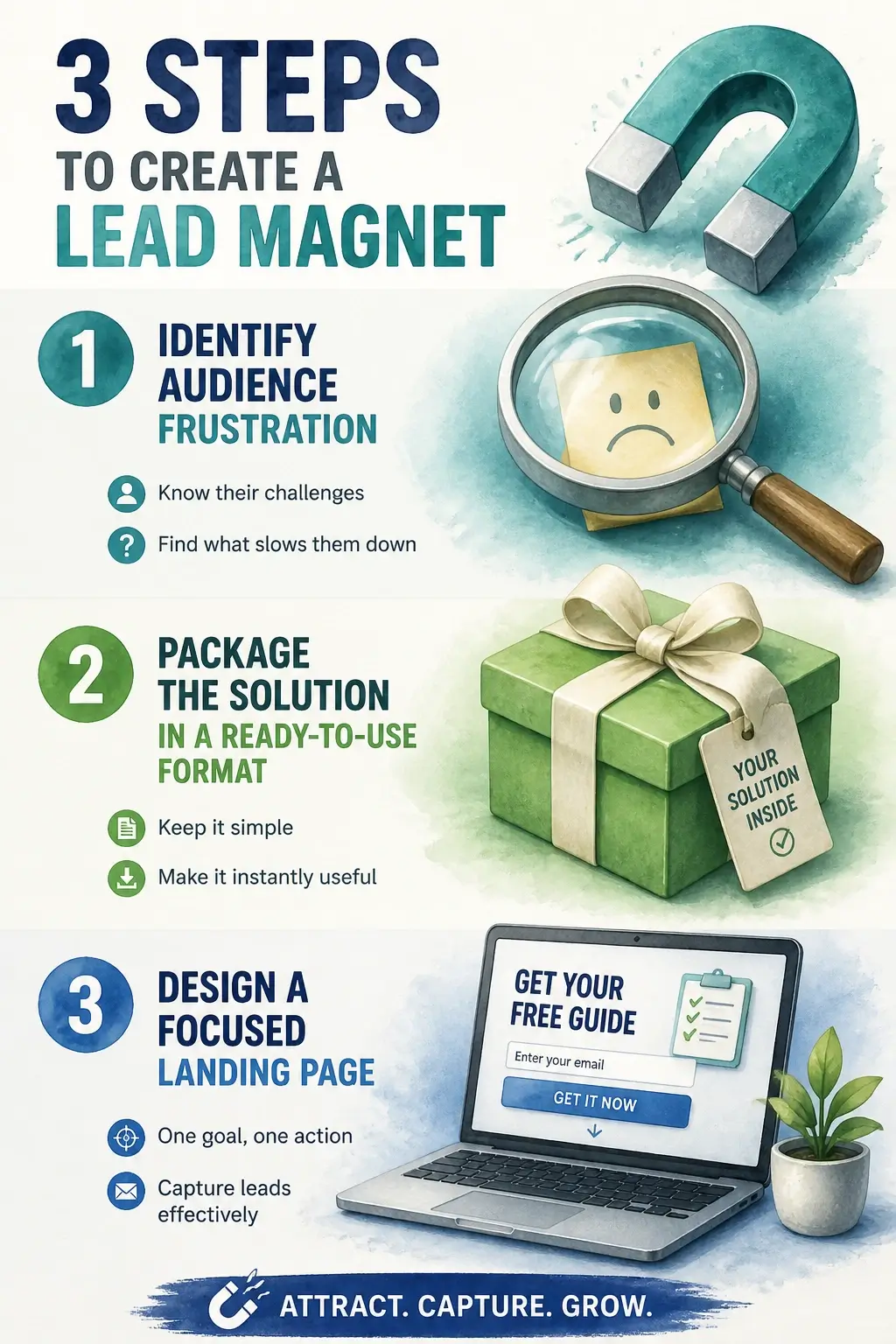
The creation process doesn’t need to be complicated. Identify your audience’s single biggest frustration. Package the solution in a format they can use immediately. Build a landing page that focuses entirely on that one outcome – no navigation links, no distractions.
Research supports this specificity-first approach. Dr. S. Bellman, Consumer Behavior and Permission Marketing Researcher, found in his work on email response rates that relevance – personalization, brand equity, and previous relationships – was the primary driver of response. A generic magnet aimed at everyone converts like a message aimed at no one.
Here’s a visual breakdown of how to structure a lead magnet that closes the value gap:
One more constraint worth enforcing: the lead magnet must be directly related to the content your email list will deliver going forward. A checklist on Instagram growth attached to a newsletter about B2B sales will build a list full of people who’ll disengage the moment the first real email arrives.
Where to Place Opt-In Forms So Visitors Can’t Ignore Them
Opt-in form placement follows a hierarchy of user intent, and getting the hierarchy wrong is the single most common reason a technically sound list-building setup produces almost no sign-ups. The closer a form is to content the visitor is already engaged with, the higher the conversion rate – because the ask is contextually relevant, not a cold interruption.
Here’s how to think about the three tiers:
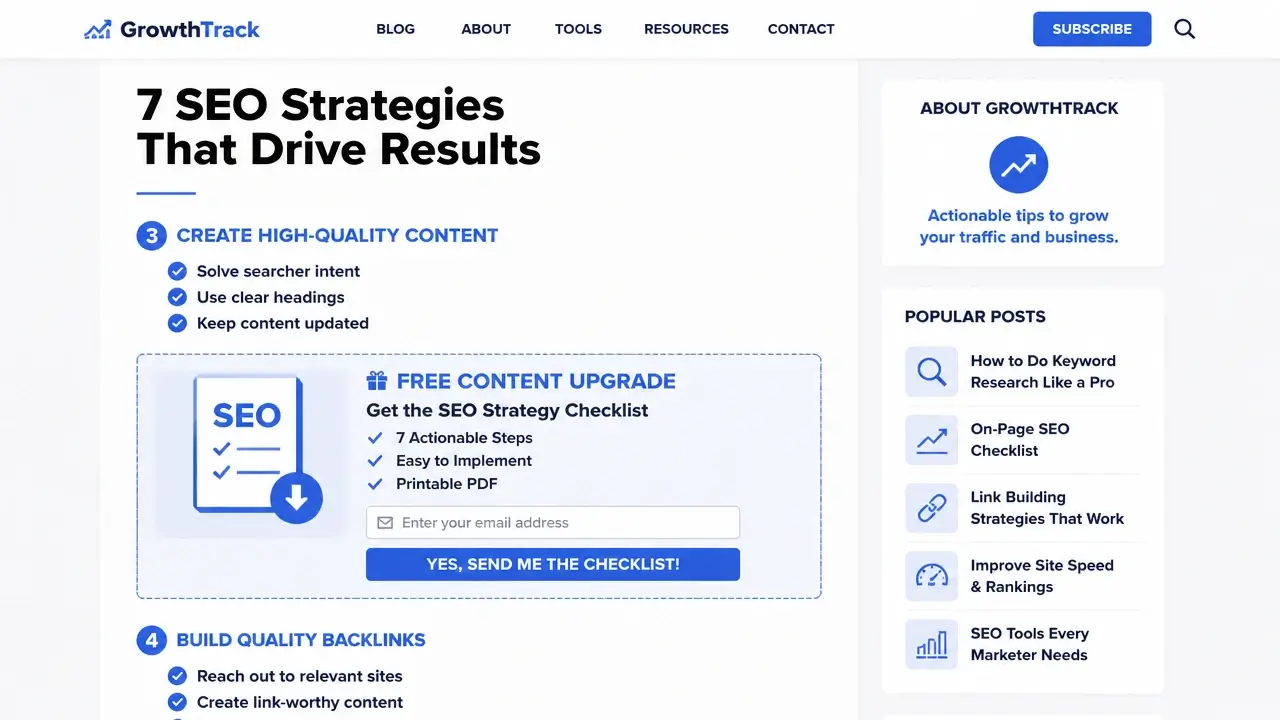
High-intent placements sit inside content the visitor chose to read. A content upgrade – a form or download link embedded within a specific blog post, offering a bonus directly related to that post – converts at the highest rate of any placement type. If someone is reading your 2,000-word guide on email segmentation, a “Download the segmentation checklist” offer mid-article is exactly what they want at exactly the right moment.
Medium-intent placements intercept visitors who are engaged but not yet committed. An exit-intent pop-up fires when the mouse cursor moves toward the browser’s close button or address bar, catching visitors before they leave without interrupting their reading. A sidebar form works similarly – visible, passive, and available whenever the reader decides they want more.
Low-intent placements – homepage banners, footer forms – capture visitors who are still orienting. They convert at lower rates, but they’re persistent and require no behavioral trigger to display.
A few execution rules that matter regardless of placement tier: keep form fields to name and email only unless you have a specific segmentation reason for a third field. Every additional field reduces conversion. And on mobile, pop-ups must comply with Google’s mobile interstitials policy – full-screen pop-ups that block content on mobile are a ranking penalty risk, not just an annoyance.
For those who aren’t using a plugin, here’s what the actual embedding process looks like. In WordPress without a dedicated plugin, go to your ESP’s form builder, generate the HTML embed code, and paste it into a Custom HTML block within your post or page editor. For sidebar placement, use a Text widget in the WordPress customizer and paste the same code there. For pop-ups, most ESPs provide a JavaScript snippet – paste it into your site’s section via a header injection field in your theme settings, or use a plugin like Insert Headers and Footers. On a custom-coded site, the embed code goes just before the closing tag.
The following visual shows how each placement type maps to a page layout:
A/B testing placement and trigger timing is worth doing – but only once the form is live and generating enough traffic to produce statistically meaningful data. Testing a form that sees 50 visitors a week tells you nothing. Get the basics running first.
Setting Up Your Confirmation Flow (And Staying Compliant)
A confirmation flow is the sequence of automated touchpoints that happen the moment someone submits your opt-in form – and it’s where most list-building setups either earn long-term subscriber trust or quietly erode it. Done right, it delivers the lead magnet, confirms consent, and sets the tone for every email that follows. Done wrong, it creates compliance exposure that can surface months later as fines or deliverability damage.
The flow has two distinct layers: the subscriber experience (double opt-in and welcome sequence) and the legal layer (GDPR and CAN-SPAM compliance). Both need to be configured before your first form goes live.
Double Opt-In and Welcome Sequence for New Subscribers
Double opt-in requires a subscriber to confirm their email address by clicking a link in a confirmation email before they’re added to your active list. The mechanics are straightforward: form submission triggers a confirmation email; the subscriber clicks the link; they land on a thank-you page and receive the lead magnet. What’s less obvious is why this step matters beyond list hygiene.
The confirmation email itself is the first signal your ESP and receiving mail servers use to assess your sender reputation. A list built on double opt-in has a structurally lower spam complaint rate – because every address on it belongs to someone who actively chose to be there twice. Dr. M. Cha, Legal and Technological Consent Architect, frames this precisely:
“An email license (EL) represents a legal agreement between the sender and the recipient upon what type of messages can be delivered, and in what restrictions. It can be issued only by the email addressee. Therefore, the email addressee can have complete control on what to receive and when to receive from a sender.”
That framing reframes double opt-in from a technicality into a principle: the subscriber is issuing a license, and your confirmation flow is how you document it.
After the confirmation click, the welcome sequence kicks in. A well-structured sequence runs three to four emails:
- Immediate confirmation email – contains the confirmation link and a brief preview of what’s coming
- Thank-you page – displayed after the link is clicked; use this page to tag the subscriber by source and lead magnet so you can segment later
- Lead magnet delivery – either on the thank-you page itself or in a follow-up email sent immediately after confirmation
- Welcome series (2–3 emails) – introduces your brand, sets expectations for email frequency and content type, and typically includes one piece of high-value content
Most ESPs automate the technical execution of this flow. Your job is to write the emails, design the thank-you page, and configure the tagging rules. The tagging step is one most guides skip – but a subscriber tagged by source (pop-up vs. content upgrade vs. referral) gives you segmentation data that compounds in value over time.
For a practical walkthrough of how to configure a double opt-in workflow inside a modern ESP, this tutorial covers the mechanics clearly:
CAN-SPAM and GDPR Compliance Essentials for Email Lists
CAN-SPAM and GDPR compliance are not interchangeable – they govern different geographies and operate on different consent models, and conflating them is a common source of legal exposure.
CAN-SPAM is U.S. law. Its requirements are relatively minimal: identify commercial messages clearly, include a valid physical postal address in every email, honor unsubscribe requests within 10 business days, and don’t use deceptive subject lines. It does not require prior consent – only a clear mechanism to opt out.
GDPR applies to any subscriber in the EU, regardless of where your business is based. Its consent standard is meaningfully higher: consent must be explicit, freely given, specific, and informed. Pre-ticked boxes are not compliant. The subscriber must take an active, affirmative step. You must link to your privacy policy at the point of sign-up, and you must be able to demonstrate that consent occurred if asked.
That last requirement is where most list-builders have a gap they don’t know about. Under GDPR, demonstrating consent means storing a timestamped record that captures what the user agreed to, which specific form they used, and which version of your privacy policy was live at that moment. Your ESP may not capture this level of granularity by default.
Check whether your platform offers a Consent Management Platform (CMP) integration or at minimum an audit log of subscriber consent events. If neither is available, maintain a manual log – a spreadsheet with subscriber email, sign-up timestamp, form identifier, and privacy policy version is sufficient for most small-scale operations. It’s not glamorous, but it’s the difference between demonstrable compliance and exposure. A privacy-by-design approach here isn’t just legal hygiene – it builds the kind of subscriber trust that shows up in open rates.
Why Buying an Email List Is a Trap (And the Rare Exception)
Purchased email lists damage sender reputation in a way that’s disproportionately severe relative to the short-term convenience they appear to offer – and the damage doesn’t stay contained to the purchased list. It bleeds into the deliverability of every email you send, including to subscribers who opted in legitimately.
Here’s the mechanism. A bulk-purchased list is full of addresses that never consented to receive email from you. A percentage of those addresses will immediately mark your email as spam. Another percentage will be spam traps – inactive addresses that ISPs and blacklist operators repurpose specifically to catch senders using purchased or scraped lists. Hit enough spam traps, and your sending domain gets blacklisted. Once blacklisted, even your organic subscribers stop receiving your emails. You haven’t just burned the purchased list – you’ve damaged the infrastructure you spent months building.
This is also a terms-of-service violation for virtually every reputable ESP. Import a purchased list into Mailchimp, ActiveCampaign, or Brevo and you risk account suspension. And from a compliance standpoint, sending to a purchased list is a GDPR and CAN-SPAM problem because there is no documented consent – the addresses were collected by someone else, under conditions you can’t verify or represent.
The “opt-in lists” sold online are rarely what they claim to be. The consent was collected for a different purpose, under different terms, by a different entity. That’s not permission – it’s a legal fiction.
The B2B exception worth understanding. The categorical rejection of all purchased contact data ignores a legitimate channel that B2B marketers use responsibly. Verified business contact databases – platforms like ZoomInfo that compile professional contact information with documented consent mechanisms – are not the same as bulk consumer spam lists. The key distinction is in how you use them.
The compliant B2B approach is not “import list, send newsletter.” It’s a one-to-one outreach sequence: identify a relevant lead, send a personalized email that clearly identifies your purpose, and request explicit consent before adding that person to any mass mailing list. That’s prospecting, not spamming. It’s a fundamentally different use case – and treating it identically to bulk list purchases causes B2B marketers to abandon a channel that, when used correctly, can feed a high-quality permission-based list. Even within that approach, use double opt-in from the first interaction and maintain consent records as you would for any other subscriber.
Troubleshooting: What to Do When Standard List-Building Advice Fails
List-building troubleshooting starts with an honest diagnosis – because the failure modes look similar on the surface (slow growth, low engagement) but have completely different root causes. Applying the wrong fix wastes weeks.
Work through the most common failure points in order:
Low sign-up volume despite decent traffic usually points to one of three causes: the lead magnet doesn’t match the audience’s actual problem, the form isn’t visible enough on the page, or the CTA copy is generic. Before changing your lead magnet entirely, test the headline and CTA copy first – they’re faster to iterate and often carry more weight than the offer itself.
High sign-up volume but low engagement is a lead magnet alignment problem. You attracted people who wanted the freebie but aren’t interested in what comes after it. This is fixable by tightening the connection between the lead magnet topic and your email content, and by setting clearer expectations in the welcome sequence about what subscribers will receive.
Deliverability issues – emails landing in spam, low open rates, sudden drops in delivery rate – almost always trace back to domain authentication gaps or a damaged sender reputation. Check SPF, DKIM, and DMARC configurations first. Then monitor your sender reputation using Google Postmaster Tools, which shows your domain reputation and spam rate as Google’s servers see it. If reputation is degraded, prune inactive subscribers – anyone who hasn’t opened an email in six months is dragging your engagement metrics down and signaling to ISPs that your list is stale.
The KPIs that actually tell you what’s broken:
- Conversion rate on your opt-in form (sign-ups ÷ form views): below 1–2% on a general form, or below 5% on a content upgrade, signals a form or offer problem
- Click-through rate on confirmation and welcome emails: below 20% on the confirmation email suggests deliverability or subject line issues
- Unsubscribe rate per campaign: above 0.5% consistently points to audience-content misalignment
- List growth rate (new subscribers minus unsubscribes ÷ total list size): tracks whether your acquisition is outpacing churn
When you’re running A/B tests to fix a low-converting form, change one variable at a time – headline, CTA copy, form length, or lead magnet offer – and run each test for at least two weeks before drawing conclusions. Testing multiple variables simultaneously makes it impossible to know what actually moved the needle.
One fix that consistently outperforms general pop-ups for sites with existing traffic: add content upgrades to your highest-traffic pages. If a post already gets 2,000 visits a month, a contextually relevant download offer embedded in that post will convert at a higher rate than any new traffic acquisition effort.
The deeper problem with most list-building guides is that they offer tactics without comparative data. You can’t scientifically allocate effort between pop-ups, content upgrades, and referral programs without knowing your own cost-per-lead and 90-day engagement rate by acquisition channel. Build that data from day one: tag every subscriber by source (pop-up, content upgrade, referral, paid) and track open rates and conversion behavior at 30, 60, and 90 days. Over time, that data replaces generic best-practice advice with something more useful – a performance model built on your actual audience. Marketers who fix failing list-building systems don’t find a better checklist. They build their own.
Key Takeaways on How to Build an Email List
- Domain authentication (SPF, DKIM, DMARC) is non-negotiable before sending a single email – without it, deliverability fails silently.
- Your email list is an owned asset; treat it as infrastructure, not a campaign metric that resets each quarter.
- A lead magnet converts best when it solves one specific problem and delivers a result in under five minutes.
- Opt-in form placement follows a user-intent hierarchy – content upgrades outperform pop-ups on conversion quality, not just volume.
- GDPR compliance requires a timestamped consent record, not just a checkbox – most ESPs don’t capture this by default.
- Tag subscribers by acquisition source from day one; 90-day engagement data by channel is the only reliable guide for budget allocation.
Frequently Asked Questions About How to Build an Email List
What’s the fastest way to grow an email list from zero?
The fastest legitimate path is adding a content upgrade to your highest-traffic page – it converts existing visitors who are already engaged rather than requiring new traffic. Pair it with a simple lead magnet you can build in a day, like a checklist or template.
How many subscribers do you need before email marketing becomes worth the effort?
There’s no magic threshold, but a list of 500 engaged subscribers who opted in for a specific reason will outperform a list of 5,000 cold or misaligned contacts. Engagement rate matters more than raw size, especially for deliverability and conversion.
Should you use single opt-in or double opt-in when starting out?
Double opt-in reduces your initial sign-up count but improves list quality, deliverability, and GDPR compliance. If you need volume fast and have rigorous list hygiene practices, single opt-in is workable – but it’s a higher-maintenance choice long-term.
What happens to your sender reputation if you send to an inactive list?
Sending to subscribers who haven’t engaged in six or more months drags down your engagement metrics, which ISPs use as a signal of list quality. Over time, this pushes even your active subscribers’ emails toward spam. Prune inactive contacts regularly.
Can you build an email list without a website?
Technically yes – some ESPs provide hosted landing pages that don’t require your own domain. But without domain authentication, your deliverability is entirely dependent on the ESP’s shared sending infrastructure, which is riskier. A domain and basic landing page is the minimum viable setup.
What’s the difference between a landing page and a sign-up form for list building?
A sign-up form is an embeddable element placed within existing pages. A landing page is a standalone page with no navigation distractions, built entirely to convert one visitor action – usually a sign-up. Landing pages typically convert higher for cold traffic; embedded forms work better for warm, existing readers.
How often should you email a new subscriber after they opt in?
The welcome sequence should run over the first 7–10 days – typically three to four emails. After that, a consistent cadence (weekly or biweekly) performs better than irregular bursts. The welcome period sets the expectation; breaking that cadence later causes higher unsubscribe rates.
What’s the right way to handle a subscriber who never opens your emails?
After 90 days of no opens, send a re-engagement email with a direct subject line asking if they still want to hear from you. If there’s no response after one or two attempts, remove them. Keeping disengaged subscribers hurts deliverability more than it helps your list count.
References
- In order to reduce false positives of anti-spam software and enable reliable message delivery – mdpi.com
- This study found that relevance-personalization, brand equity, and previous relationships-influenced response rates – sciencedirect.com
- An email license (EL) represents a legal agreement between the sender and the recipient – sciencedirect.com